Fill a dynamic XFA form in C#
Load the form with PdfFormManager: a dynamic XFA form lists its fields in Fields as the usual field types, named by their path in the form. Setting a value runs the form's own scripts, and the filled form is saved as the same dynamic form or flattened into the pages it lays out.
Compiled and run: Linux x64 · Windows x64
Build it step by step.
-
1Install the NuGet packages
SelectPdf.Universalis the library. The native package carries the Chromium engine for one platform: add the one for the platform you run on.dotnet add package SelectPdf.Universal dotnet add package SelectPdf.Universal.Native.win-x64
dotnet add package SelectPdf.Universal
dotnet add package SelectPdf.Universal.Native.linux-x64
dotnet add package SelectPdf.Universal
dotnet add package SelectPdf.Universal.Native.linux-arm64
dotnet add package SelectPdf.Universal
dotnet add package SelectPdf.Universal.Native.osx-arm64
-
2Create a console app
Any .NET 8 or .NET 10 project works. To follow along, create a console app, run the install commands above inside its folder, then replace
Program.cswith the code below.dotnet new console -n PdfSample cd PdfSample
-
3Load the XFA form
// load the dynamic XFA form: its fields come from its XFA template PdfFormManager form = new PdfFormManager(); form.Load("xfa-form.pdf"); Console.WriteLine($"XFA form: {form.IsXfaForm}, {form.Fields.Count} fields");PdfFormManager.Loadopens the form.IsXfaFormsays whether it is defined in XFA, andFieldsholds the fields of its XFA template, here nine of them. -
4Find each field by its path or its name
// a field is found by its path in the form, or by its own name
((PdfFormFieldTextBox)form.Fields["form1.Page1.Name"]).Text = "Jane Doe";

// a date is set as the form keeps it: yyyy-MM-dd
((PdfFormFieldTextBox)form.Fields["BirthDate"]).Text = "1985-03-14";
form1.Page1.Nameis the name field's path in the form, with the[0]indexes left out;BirthDateis a field's own name, which finds the first field of that name. A date is set as the form keeps it, as yyyy-MM-dd, and a number with a period. -
5Set the values and let the form's scripts run
// setting the quantity runs the form's own calculation of the total
((PdfFormFieldTextBox)form.Fields["Quantity"]).Text = "4";
((PdfFormFieldComboBox)form.Fields["Delivery"]).SelectedValue = "EXP";
((PdfFormFieldCheckBox)form.Fields["Agree"]).Checked = true;
Setting a value is typing it and leaving the field: the form's scripts for the change run, then its calculations and its validation. Setting the quantity makes the form calculate the total. The drop-down list takes one of its values (
EXP) and the check boxChecked, as for an AcroForm. -
6Read a value as the form shows it
// FormattedValue is the value as the form shows it Console.WriteLine($"Total: {form.Fields["Total"].FormattedValue}");Textis the value as the form keeps it (50);FormattedValueis the value formatted by the field's display pattern, so the calculated total reads50.00. -
7Save as XFA, and flattened
// save it as the same dynamic form, still fillable form.Save("xfa-form-filled.pdf"); // and as the pages it lays out, with the values and no form form.Flatten = true; form.Save("xfa-form-flattened.pdf"); form.Close();Savewritesxfa-form-filled.pdfas the same dynamic form, still fillable in a viewer that shows XFA forms. WithFlattenset, the second save writesxfa-form-flattened.pdf: the pages the form lays out, with the values it holds and no form, readable in any viewer. -
8Run it
dotnet run
The program writes
xfa-form-flattened.pdfto the working folder. Without a license key, every page carries a trial watermark; setGlobalProperties.LicenseKeybefore the first conversion to remove it.
The complete Program.cs.
This is the exact file our samples pipeline compiled and ran on Linux x64 and Windows x64 to produce the output on this page.
using SelectPdf.Universal;

// load the dynamic XFA form: its fields come from its XFA template
PdfFormManager form = new PdfFormManager();
form.Load("xfa-form.pdf");
Console.WriteLine($"XFA form: {form.IsXfaForm}, {form.Fields.Count} fields");

// a field is found by its path in the form, or by its own name
((PdfFormFieldTextBox)form.Fields["form1.Page1.Name"]).Text = "Jane Doe";

// a date is set as the form keeps it: yyyy-MM-dd
((PdfFormFieldTextBox)form.Fields["BirthDate"]).Text = "1985-03-14";

// setting the quantity runs the form's own calculation of the total
((PdfFormFieldTextBox)form.Fields["Quantity"]).Text = "4";
((PdfFormFieldComboBox)form.Fields["Delivery"]).SelectedValue = "EXP";
((PdfFormFieldCheckBox)form.Fields["Agree"]).Checked = true;

// FormattedValue is the value as the form shows it
Console.WriteLine($"Total: {form.Fields["Total"].FormattedValue}");

// save it as the same dynamic form, still fillable
form.Save("xfa-form-filled.pdf");

// and as the pages it lays out, with the values and no form
form.Flatten = true;
form.Save("xfa-form-flattened.pdf");
form.Close();
Open the project on GitHub → this program and the variations below, ready to dotnet run
The PDF it produces.
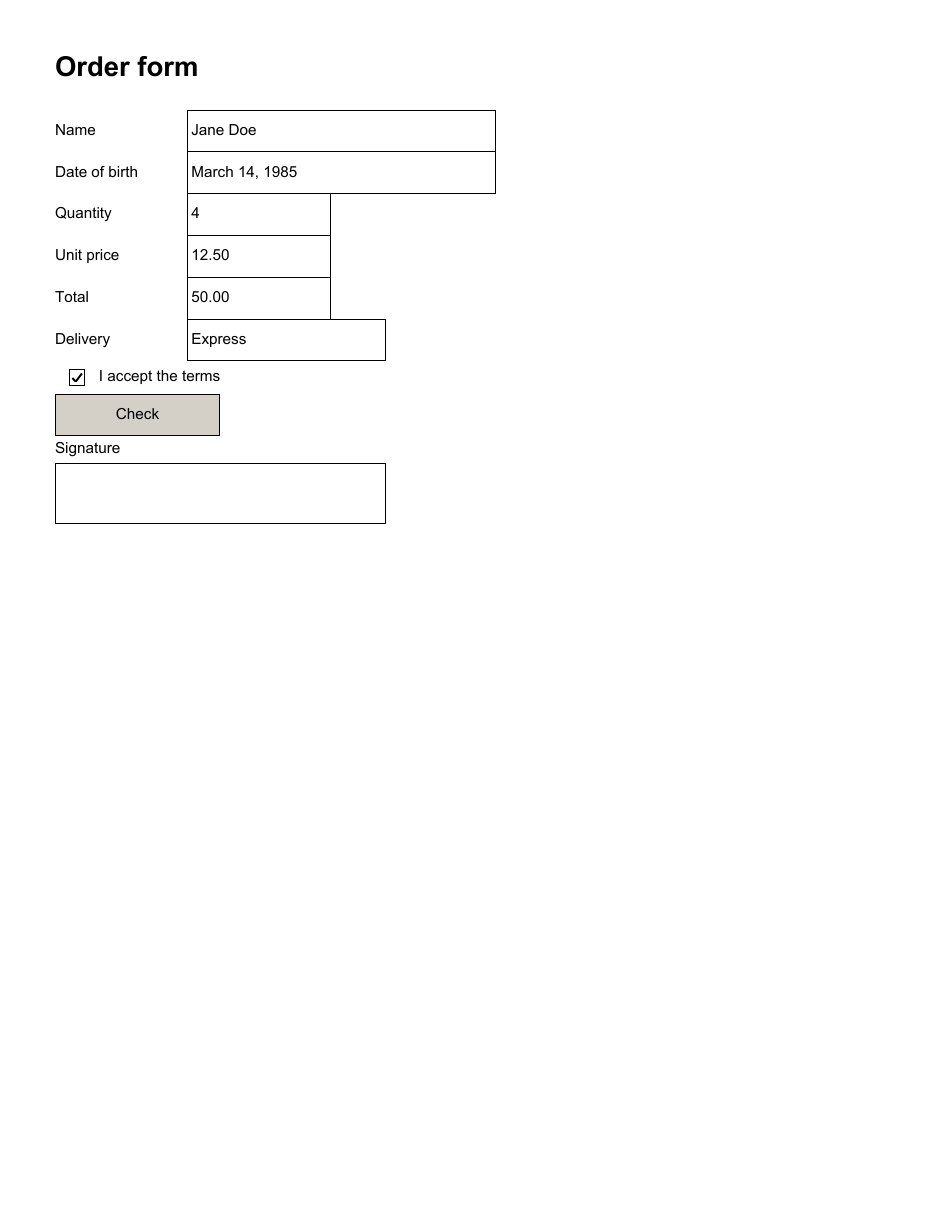
Download xfa-form-flattened.pdf ↓ the file this sample produced, unedited
Variations you will need next.
Each variation is a separate file in the same project, compiled and run with the program above.
List the fields of an XFA form with what they show
FullName is a field's path in the form, such as form1[0].Page1[0].Name[0]. To build your own page for a form, read what each field shows the user: Caption is the label beside it, and ToolTip, Required and ReadOnly come with it. A drop-down list keeps its values in Items and shows the texts in ItemTexts. The Check button and the signature field are listed as plain PdfFormField objects.
using SelectPdf.Universal;

static class ListXfaFields
{
    public static void Run()
    {
        PdfFormManager form = new PdfFormManager();
        form.Load("xfa-form.pdf");

        // what each field shows the user: its caption, tooltip and whether it is required
        List<string> lines = new List<string>();
        foreach (PdfFormField field in form.Fields)
        {
            lines.Add($"{field.FullName} ({field.GetType().Name})");
            lines.Add($"  caption: {field.Caption}, required: {field.Required}, read-only: {field.ReadOnly}");
            if (field.ToolTip != null)
                lines.Add($"  tooltip: {field.ToolTip}");
            if (!string.IsNullOrEmpty(field.FormattedValue))
                lines.Add($"  shows: {field.FormattedValue}");

            // a drop-down list: the values it keeps and the texts it shows
            if (field is PdfFormFieldComboBox list)
                lines.Add($"  values: {string.Join(", ", list.Items)} ({string.Join(", ", list.ItemTexts)})");
        }
        form.Close();

        File.WriteAllLines("xfa-form-fields.txt", lines);
        lines.ForEach(Console.WriteLine);
    }
}
Read what the form's scripts report and press its buttons
A quantity of 0 is refused by the form's own validation, and its message is added to ScriptMessages. Click presses one of the form's buttons, here its Check button, whose script reports that the order is complete. ScriptErrors holds the errors the form's scripts failed with, so an empty list means no script failed.
using SelectPdf.Universal;

static class CheckWithFormScripts
{
    public static void Run()
    {
        PdfFormManager form = new PdfFormManager();
        form.Load("xfa-form.pdf");

        // a value the form's validation refuses: its message is in ScriptMessages
        PdfFormFieldTextBox quantity = (PdfFormFieldTextBox)form.Fields["Quantity"];
        quantity.Text = "0";

        // correct it and fill the rest
        quantity.Text = "2";
        ((PdfFormFieldTextBox)form.Fields["Name"]).Text = "Jane Doe";
        ((PdfFormFieldCheckBox)form.Fields["Agree"]).Checked = true;

        // press the form's own Check button: its click script runs
        form.Click(form.Fields["Check"]);

        // what the form's scripts reported, and the scripts that failed
        List<string> lines = new List<string>();
        foreach (string message in form.ScriptMessages)
            lines.Add("message: " + message);
        foreach (string error in form.ScriptErrors)
            lines.Add("error: " + error);
        form.Close();

        File.WriteAllLines("xfa-form-messages.txt", lines);
        lines.ForEach(Console.WriteLine);
    }
}
Sign the form's own signature field
Save() with no arguments returns the filled form as bytes, which PdfSecurityManager.Load takes directly. Naming the form's signature field in Sign, by its path or its own name, signs the form there: the signature covers the whole file, and the signed document still opens as an XFA form. The sample makes a self-signed test certificate; use the .pfx file your certificate authority issued.
using System.Security.Cryptography;
using System.Security.Cryptography.X509Certificates;
using SelectPdf.Universal;

static class SignXfaForm
{
    public static void Run()
    {
        // a self-signed test certificate; in production, use the .pfx your certificate authority issued
        using (RSA key = RSA.Create(2048))
        {
            var request = new CertificateRequest("CN=Jane Doe, O=Example Ltd", key,
                HashAlgorithmName.SHA256, RSASignaturePadding.Pkcs1);
            using X509Certificate2 certificate = request.CreateSelfSigned(
                DateTimeOffset.UtcNow.AddDays(-1), DateTimeOffset.UtcNow.AddYears(1));
            File.WriteAllBytes("signer.pfx", certificate.Export(X509ContentType.Pfx, "pfx-password"));
        }

        // fill the form and keep it as an XFA form
        PdfFormManager form = new PdfFormManager();
        form.Load("xfa-form.pdf");
        ((PdfFormFieldTextBox)form.Fields["Name"]).Text = "Jane Doe";
        ((PdfFormFieldTextBox)form.Fields["Quantity"]).Text = "3";
        ((PdfFormFieldCheckBox)form.Fields["Agree"]).Checked = true;
        byte[] filled = form.Save();
        form.Close();

        // sign the form's own signature field, named by its path or its own name
        PdfSecurityManager security = new PdfSecurityManager();
        security.Load(filled);
        security.Sign("signer.pfx", "pfx-password", "Signature",
            "Order approved", "London", "");
        security.Save("xfa-form-signed.pdf");
        security.Close();
    }
}
Common problems and fixes.
The saved form shows only a placeholder page
A dynamic XFA form carries one placeholder page, and a viewer that shows XFA forms builds the real pages from the template. A viewer that does not show XFA forms shows only the placeholder. Set Flatten = true before saving to get the pages the form lays out, readable in any viewer.
Fields is empty for an XFA form
With XfaMode = PdfFormXfaMode.AcroForm the XFA is ignored, and a form that lays itself out then has no fields. XfaMode applies to the documents loaded after it is set, so set it before Load. In the default Auto mode, ScriptErrors says why a form could not be opened as XFA. A form that was flattened and saved has no fields left.
A date or a number is refused
Set a date as yyyy-MM-dd and a number with a period as its decimal separator, as the form keeps them, not as the form shows them. A value the form's validation refuses is reported in ScriptMessages.
A hybrid form loses its XFA when saved
A hybrid form has AcroForm fields beside its XFA. In the default Auto mode it is filled through its AcroForm fields and saved without its XFA. Set XfaMode = PdfFormXfaMode.Xfa before Load to keep the XFA, given the same values as the fields, so a viewer that shows the XFA shows them too.
Good to know.
- A dynamic XFA form, one that lays itself out, has its fields only in its XFA template: the document carries one placeholder page and no AcroForm fields, and a viewer builds the pages from the template. Source
- PdfFormManager fills a dynamic XFA form through the same field types as an AcroForm: text, numeric, date and password fields are PdfFormFieldTextBox, and check boxes, drop-down lists, lists and groups of radio buttons are PdfFormFieldCheckBox, PdfFormFieldComboBox, PdfFormFieldListBox and PdfFormFieldRadioButtonList. Source
- A field of an XFA form is named by its path in the form, such as form1[0].Page1[0].Name[0], where the [0] indexes can be left out, or by its own name for the first field of that name. Source
- Setting a value of an XFA form runs the form's own scripts for the change, then its calculations and its validation. ScriptMessages holds what the scripts report, ScriptErrors the errors they failed with, and Click presses one of the form's buttons. Source
- A filled XFA form is saved as the same dynamic form or, with Flatten, as the pages it lays out with the values it holds. Source
- XfaMode chooses how a form defined in XFA is filled: Auto (the default) fills a hybrid form through its AcroForm fields and saves it without its XFA, Xfa keeps the hybrid's XFA with the same values, and AcroForm ignores the XFA. Source
- A form set in Myriad Pro, the font Adobe LiveCycle Designer uses by default, keeps its layout on a machine without Acrobat, a Linux server for example: the library carries Source Sans 3, a font of the same widths. Source
Questions, answered.
Short answers about this guide. The SelectPdf.Universal documentation covers every class and option.