Fonts on Linux: the same PDF on every server, in every language (C#)
A Linux server or container image has few fonts or none, so text in a PDF can change width or turn into empty boxes. SelectPdf.Universal carries metric-compatible fonts for Arial, Times New Roman and Courier New, and the SelectPdf.Universal.Fonts package adds Noto fonts for every other script, with nothing to install on the server.
Compiled and run: Linux ARM64 · Linux x64 · macOS ARM64 · Windows x64
Build it step by step.
-
1Install the NuGet packages
SelectPdf.Universalis the library. The native package carries the Chromium engine for one platform: add the one for the platform you run on.dotnet add package SelectPdf.Universal dotnet add package SelectPdf.Universal.Native.win-x64 dotnet add package SelectPdf.Universal.Fonts
dotnet add package SelectPdf.Universal
dotnet add package SelectPdf.Universal.Native.linux-x64
dotnet add package SelectPdf.Universal.Fonts
dotnet add package SelectPdf.Universal
dotnet add package SelectPdf.Universal.Native.linux-arm64
dotnet add package SelectPdf.Universal.Fonts
dotnet add package SelectPdf.Universal
dotnet add package SelectPdf.Universal.Native.osx-arm64
dotnet add package SelectPdf.Universal.Fonts
-
2Create a console app
Any .NET 8 or .NET 10 project works. To follow along, create a console app, run the install commands above inside its folder, then replace
Program.cswith the code below.dotnet new console -n PdfSample cd PdfSample
-
3Reference the fonts package and import the namespace
using SelectPdf.Universal;
Next to
SelectPdf.Universaland the engine package, the project referencesSelectPdf.Universal.Fonts(see the install tabs). On build and publish it copies Google's Noto fonts tofonts/notonext to the application, where the engine finds them. There is nothing to install on the server or in the image, and no setting in the code. -
4Write a page with many scripts
// 1. One page, many scripts. Arial and Times New Roman are not on a Linux server:
// the library's Liberation fonts stand in for them with the same measurements,
// and the SelectPdf.Universal.Fonts package (in the .csproj) covers the other scripts.
string html = """
    <html><body style="font-family: Arial, sans-serif; font-size: 18px">
      <h1>Invoice total</h1>
      <table cellpadding="6">
        <tr><td>English</td><td>Invoice total</td></tr>
        <tr><td>Greek</td><td>Σύνολο τιμολογίου</td></tr>
        <tr><td>Russian</td><td>Итого по счёту</td></tr>
        <tr><td>Arabic</td><td dir="rtl">إجمالي الفاتورة</td></tr>
        <tr><td>Hindi</td><td>चालान का कुल योग</td></tr>
        <tr><td>Thai</td><td>ยอดรวมใบแจ้งหนี้</td></tr>
        <tr><td>Chinese</td><td>发票总额</td></tr>
        <tr><td>Japanese</td><td>請求書の合計</td></tr>
        <tr><td>Korean</td><td>청구서 합계</td></tr>
      </table>
      <p style="font-family: 'Times New Roman', serif">Times New Roman text keeps its width
      on every server, so lines break in the same places.</p>
    </body></html>
    """;
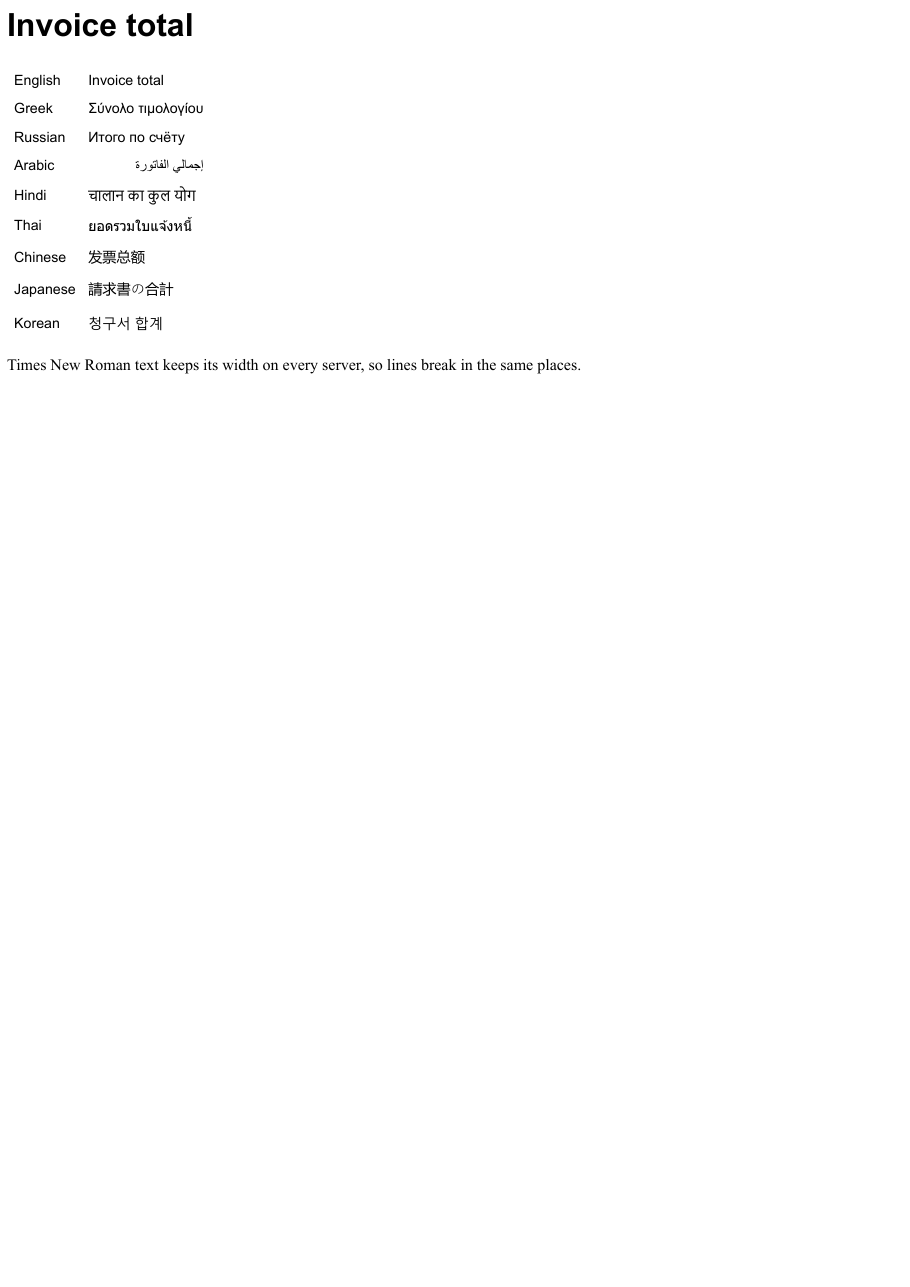
The page uses Arial and Times New Roman, which a Linux server does not have. The library's Liberation Sans and Liberation Serif stand in for them with the same character widths, so lines wrap in the same places as on Windows. The table holds Greek, Cyrillic, Arabic (right to left), Hindi, Thai, Chinese, Japanese and Korean: the scripts that print as empty boxes on a server without fonts.
-
5Convert and save
// 2. Convert and save. Nothing in the code changes between Windows and Linux.
HtmlToPdf converter = new HtmlToPdf();
PdfDocument doc = converter.ConvertHtmlString(html);
doc.Save("languages.pdf");
doc.Close();
The conversion code is the same on every platform. Verified on a Linux image with no fonts installed at all, every line prints in its own script.
-
6Run it
dotnet run
The program writes
languages.pdfto the working folder. Without a license key, every page carries a trial watermark; setGlobalProperties.LicenseKeybefore the first conversion to remove it.
The complete Program.cs.
This is the exact file our samples pipeline compiled and ran on Linux ARM64 and Linux x64 and macOS ARM64 and Windows x64 to produce the output on this page.
using SelectPdf.Universal;

// 1. One page, many scripts. Arial and Times New Roman are not on a Linux server:
// the library's Liberation fonts stand in for them with the same measurements,
// and the SelectPdf.Universal.Fonts package (in the .csproj) covers the other scripts.
string html = """
    <html><body style="font-family: Arial, sans-serif; font-size: 18px">
      <h1>Invoice total</h1>
      <table cellpadding="6">
        <tr><td>English</td><td>Invoice total</td></tr>
        <tr><td>Greek</td><td>Σύνολο τιμολογίου</td></tr>
        <tr><td>Russian</td><td>Итого по счёту</td></tr>
        <tr><td>Arabic</td><td dir="rtl">إجمالي الفاتورة</td></tr>
        <tr><td>Hindi</td><td>चालान का कुल योग</td></tr>
        <tr><td>Thai</td><td>ยอดรวมใบแจ้งหนี้</td></tr>
        <tr><td>Chinese</td><td>发票总额</td></tr>
        <tr><td>Japanese</td><td>請求書の合計</td></tr>
        <tr><td>Korean</td><td>청구서 합계</td></tr>
      </table>
      <p style="font-family: 'Times New Roman', serif">Times New Roman text keeps its width
      on every server, so lines break in the same places.</p>
    </body></html>
    """;

// 2. Convert and save. Nothing in the code changes between Windows and Linux.
HtmlToPdf converter = new HtmlToPdf();
PdfDocument doc = converter.ConvertHtmlString(html);
doc.Save("languages.pdf");
doc.Close();
Open the project on GitHub → this program and the variations below, ready to dotnet run
The PDF it produces.
Download languages.pdf ↓ the file this sample produced, unedited
Variations you will need next.
Each variation is a separate file in the same project, compiled and run with the program above.
Your company font, shipped with the application
The font file goes next to the program (here Fraunces, under the SIL Open Font License) and an @font-face rule loads it by a relative path, resolved against the base URL passed to ConvertHtmlString. Alternatively, put the files in a fonts folder copied to the output (<None Include="fonts\**" CopyToOutputDirectory="PreserveNewest" CopyToPublishDirectory="PreserveNewest" />): the page can then ask for the family by name, and PdfFont.CreateFromSystemFont finds it for headers and footers too.
using SelectPdf.Universal;

static class CorporateFont
{
    public static void Run()
    {
        // the font file ships with the application (Fraunces, SIL Open Font License);
        // @font-face loads it by a relative path, resolved against the base URL
        string html = """
            <style>
              @font-face { font-family: "Brand"; src: url("Fraunces-SemiBold.ttf"); }
              h1 { font-family: "Brand", serif; font-size: 40px; }
            </style>
            <h1>Quarterly report</h1>
            <p style="font-family: sans-serif">The heading uses the company font on every server.</p>
            """;

        string folder = Path.GetFullPath(".") + Path.DirectorySeparatorChar;
        HtmlToPdf converter = new HtmlToPdf();
        PdfDocument doc = converter.ConvertHtmlString(html, new Uri(folder).AbsoluteUri);
        doc.Save("brand-font.pdf");
        doc.Close();
    }
}
A web font from a font service
A <link> to Google Fonts works as it does in a browser: the engine downloads the font during the conversion. The server needs outbound access to the font service; for servers without it, ship the font file instead.
using SelectPdf.Universal;

static class WebFontFromUrl
{
    public static void Run()
    {
        // a web font from a font service: the engine downloads it like a browser does
        string html = """
            <link rel="stylesheet" href="https://fonts.googleapis.com/css2?family=Lobster&display=swap">
            <h1 style="font-family: 'Lobster', cursive; font-size: 44px">Summer sale</h1>
            <p style="font-family: sans-serif">Loaded from Google Fonts during the conversion.</p>
            """;

        HtmlToPdf converter = new HtmlToPdf();
        PdfDocument doc = converter.ConvertHtmlString(html);
        doc.Save("web-font.pdf");
        doc.Close();
    }
}
Common problems and fixes.
Text shows as empty boxes on Linux
The server has no font for that script. Reference SelectPdf.Universal.Fonts, or install fonts in the image (apt-get install fonts-noto-core fonts-noto-cjk on Debian and Ubuntu). The built-in Liberation fonts cover Latin, Greek and Cyrillic only.
Lines wrap differently than on Windows
A font the page asks for is missing and another one, with other widths, replaced it. Arial, Times New Roman and Courier New are covered by the built-in Liberation fonts; for other fonts, ship the font files with the application.
The deployment is larger by about 92 MB
That is the Noto fonts. They are not copied for Windows builds; set the SelectPdfFonts property to false to leave them out of any other build that does not need them.
My company font is ignored
Use .ttf, .otf or .ttc files in the fonts folder, or an @font-face with a URL the converter can load. Check the family name the page asks for matches the font's own name, and that the font's license allows you to distribute it.
Good to know.
- The library carries the Liberation fonts (Sans, Serif and Mono), with the same measurements as Arial, Times New Roman and Courier New; they cover Latin, Greek and Cyrillic. Source
- The SelectPdf.Universal.Fonts package contains Google's Noto fonts for every script Noto covers, plus Noto Sans CJK and Noto Color Emoji; about 270 files and 92 MB. Source
- On build and publish the Noto fonts are copied to fonts/noto next to the application; nothing is installed on the server, and installed fonts still win. Source
- The Noto fonts are not copied for a Windows runtime identifier, since Windows has these scripts; SelectPdfFonts=false leaves them out of any build. Source
- Font files (.ttf, .otf, .ttc) in a fonts folder copied next to the application are used on every platform, by the page and by text the library draws. Source
Questions, answered.
Short answers about this guide. The SelectPdf.Universal documentation covers every class and option.