Convert DOCX to PDF on Linux in C#
WordToPdf converts a Word document to a PdfDocument with one call, on Windows, Linux and macOS, with no Microsoft Word or Office on the server. Fonts the host does not have come from the Liberation fonts bundled with the library, so the same DOCX converts in a Linux container with no fonts installed.
Compiled and run: Linux ARM64 · Linux x64 · macOS ARM64 · Windows x64
Build it step by step.
-
1Install the NuGet packages
SelectPdf.Universalis the library. This guide needs no native engine package, so the same install command works on every platform.dotnet add package SelectPdf.Universal
-
2Create a console app
Any .NET 8 or .NET 10 project works. To follow along, create a console app, run the install command above inside its folder, then replace
Program.cswith the code below.dotnet new console -n PdfSample cd PdfSample
-
3Import the namespace
using SelectPdf.Universal;
WordToPdfand everything it returns are inSelectPdf.Universal. Word to PDF needs only theSelectPdf.Universalpackage; the Native package is needed when you also convert HTML. -
4Create the converter
WordToPdf converter = new WordToPdf();
WordToPdfexposesOptions,HeaderandFooter, the same way the HTML converter does. -
5Keep the pages of the Word document
// Document (the default): every page keeps the size and orientation it has in Word
converter.Options.PageSetup = WordPageSetup.Document;
WordPageSetup.Document, the default, keeps every page the size and orientation the Word document gives it.WordPageSetup.Optionsreflows the text onto the page size, orientation and margins of the options instead (see the first variation). -
6Build the outline from the headings
// the PDF outline is built from the document's headings
converter.Options.Bookmarks = WordBookmarks.Headings;
Bookmarksdecides what the PDF outline is made from: the document's headings (the default, nested by level), its Word bookmarks, or nothing. -
7Convert the DOCX file
// the format is taken from the file extension PdfDocument doc = converter.ConvertFile("report.docx"); Console.WriteLine($"Pages: {converter.ConversionResult.PdfPageCount}, bookmarks: {doc.Bookmarks.Count}");ConvertFiletakes the format from the file extension and returns aPdfDocument.ConversionResultdescribes the document produced, here its page count. A missing or unreadable file throwsWordToPdfException. -
8Save the PDF
doc.Save("report.pdf"); doc.Close();Savewrites the file andClosereleases the document. Before saving, thePdfDocumentcan be changed like any other: stamped, merged or encrypted. -
9Run it
dotnet run
The program writes
report.pdfto the working folder. Without a license key, every page carries a trial watermark; setGlobalProperties.LicenseKeybefore the first conversion to remove it.
The complete Program.cs.
This is the exact file our samples pipeline compiled and ran on Linux ARM64 and Linux x64 and macOS ARM64 and Windows x64 to produce the output on this page.
using SelectPdf.Universal;

WordToPdf converter = new WordToPdf();

// Document (the default): every page keeps the size and orientation it has in Word
converter.Options.PageSetup = WordPageSetup.Document;

// the PDF outline is built from the document's headings
converter.Options.Bookmarks = WordBookmarks.Headings;

// the format is taken from the file extension
PdfDocument doc = converter.ConvertFile("report.docx");
Console.WriteLine($"Pages: {converter.ConversionResult.PdfPageCount}, bookmarks: {doc.Bookmarks.Count}");

doc.Save("report.pdf");
doc.Close();
Open the project on GitHub → this program and the variations below, ready to dotnet run
The PDF it produces.
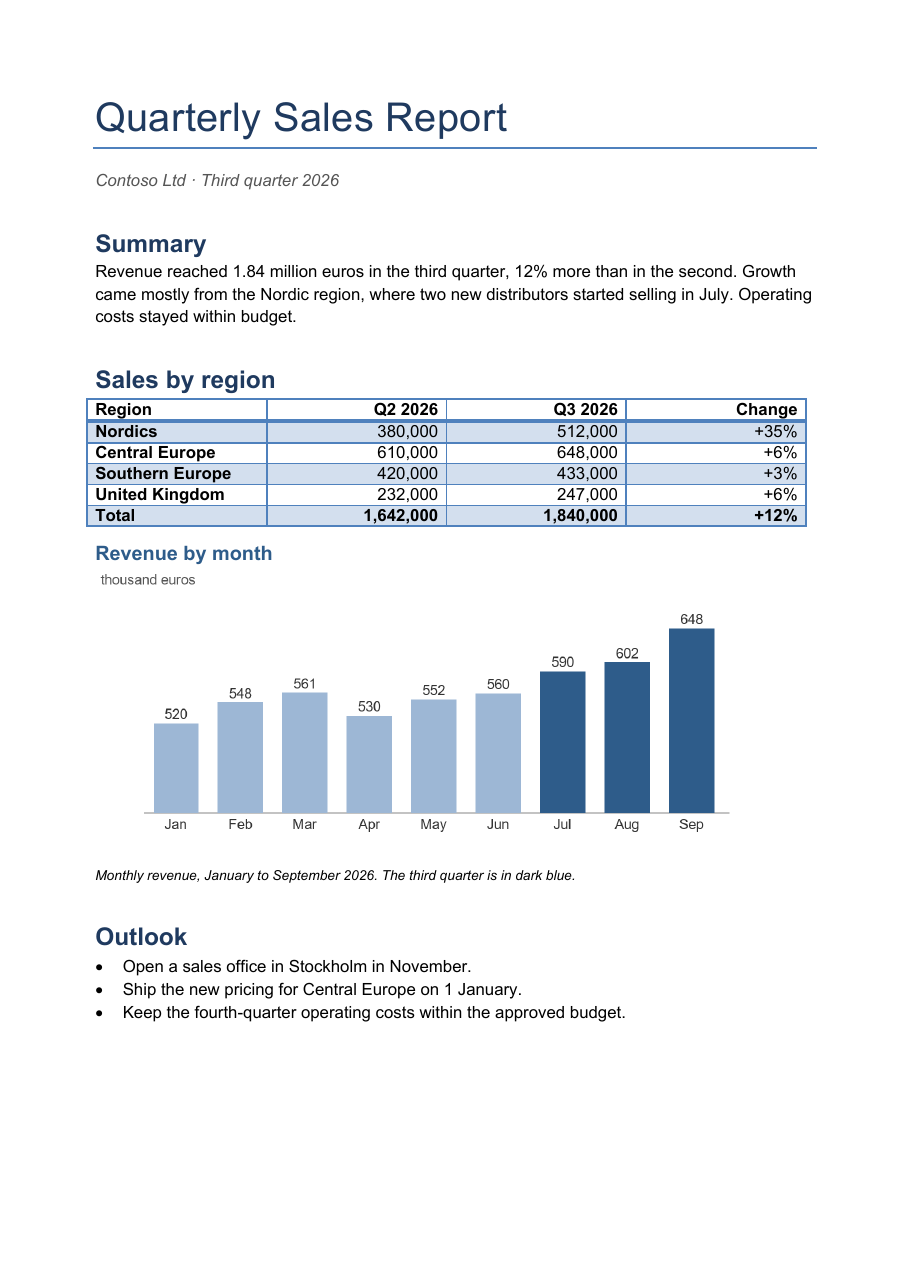
Download report.pdf ↓ the file this sample produced, unedited
Variations you will need next.
Each variation is a separate file in the same project, compiled and run with the program above.
Reflow onto A4 landscape with page numbers
WordPageSetup.Options reflows the text onto PdfPageSize, PdfPageOrientation and the margins of the options (in points, 72 to the inch), replacing the Word document's own margins. DisplayFooter and a PdfTextSection with {page_number} and {total_pages} add a page-number footer band.
using SelectPdf.Universal;

static class ReflowA4Landscape
{
    public static void Run()
    {
        WordToPdf converter = new WordToPdf();

        // Options: reflow the text onto A4 landscape with one-inch (72 pt) margins
        converter.Options.PageSetup = WordPageSetup.Options;
        converter.Options.PdfPageSize = PdfPageSize.A4;
        converter.Options.PdfPageOrientation = PdfPageOrientation.Landscape;
        converter.Options.MarginTop = 72;
        converter.Options.MarginBottom = 72;
        converter.Options.MarginLeft = 72;
        converter.Options.MarginRight = 72;

        // page numbers in a footer band
        converter.Options.DisplayFooter = true;
        converter.Footer.Height = 30;
        converter.Footer.Add(new PdfTextSection(0, 10, 500, "Page {page_number} of {total_pages}",
            PdfFont.CreateStandardFont(PdfStandardFont.Helvetica, 9), new PdfColor(80, 80, 80)));

        PdfDocument doc = converter.ConvertFile("report.docx");
        doc.Save("report-a4-landscape.pdf");
        doc.Close();
    }
}
Convert a DOCX held in memory
ConvertBytes converts a document held in a byte array, such as a file uploaded to a web app, and ConvertStream reads one from a stream. The format is detected from the content for docx, doc, rtf and WordML; plain text, html and markdown must be named with the WordFormat overload. Save() without arguments returns the PDF as a byte array.
using SelectPdf.Universal;

static class ConvertUploadedBytes
{
    public static void Run()
    {
        // a document held in memory, such as a file uploaded to a web app
        byte[] upload = File.ReadAllBytes("report.docx");

        // the format is detected from the content (docx, doc, rtf, WordML)
        WordToPdf converter = new WordToPdf();
        PdfDocument doc = converter.ConvertBytes(upload);

        // Save() without arguments returns the PDF as a byte array
        byte[] pdf = doc.Save();
        doc.Close();

        File.WriteAllBytes("report-from-bytes.pdf", pdf);
    }
}
Put a cover page in front of the converted document
The Word converter returns a PdfDocument, like the HTML converter, so the two combine with Append. The appended documents must stay open until the merged document is saved. Converting the HTML cover needs the SelectPdf.Universal.Native package for your platform, for example SelectPdf.Universal.Native.linux-x64.
using SelectPdf.Universal;

static class AddCoverPage
{
    public static void Run()
    {
        // a cover page made from HTML
        HtmlToPdf html = new HtmlToPdf();
        PdfDocument cover = html.ConvertHtmlString("""
            <div style="font-family: Arial; margin-top: 300px; text-align: center">
              <h1>Contoso Ltd</h1>
              <p>Board pack, October 2026</p>
            </div>
            """);

        // the Word document, converted straight into a PdfDocument
        PdfDocument report = new WordToPdf().ConvertFile("report.docx");

        // append both to a new document; they stay open until it is saved
        PdfDocument pack = new PdfDocument();
        pack.Append(cover);
        pack.Append(report);
        pack.Save("board-pack.pdf");

        pack.Close();
        cover.Close();
        report.Close();
    }
}
Common problems and fixes.
Chinese, Arabic or Hindi text prints as empty boxes on Linux
The bundled Liberation fonts cover Latin, Greek and Cyrillic only. Install fonts for those scripts on the host, or reference the SelectPdf.Universal.Fonts package, which carries the Noto fonts for every script Noto covers.
The page size options have no effect
With the default WordPageSetup.Document, PdfPageSize and PdfPageOrientation are ignored and the Word pages keep their own size. Set PageSetup = WordPageSetup.Options to reflow onto the page size of the options.
WordToPdfException: the file does not exist
A relative file name is resolved against the current directory of the process, which is not always the folder of the application. Pass a full path, for example one built from AppContext.BaseDirectory.
The DOCX is password-protected
Set converter.Options.Password to the password of the encrypted Word document before converting.
Good to know.
- Converting Word to PDF needs no Microsoft Word or Office: the Word engine is part of the SelectPdf.Universal library. Source
- The converter reads docx, docm, dotx, dotm, doc and dot files, plus rtf, plain text, WordML, html and markdown. Source
- A font family the host does not have is served from the bundled Liberation fonts, metric-compatible with Arial, Times New Roman and Courier New, so the same document converts in a Linux container with no fonts installed. Source
- The bundled Liberation fonts cover Latin, Greek and Cyrillic; for other scripts, install fonts on the host or reference the SelectPdf.Universal.Fonts package. Source
- The Word to PDF converter is available only in the full commercial SelectPdf library, not in the free Community Edition. Source
Questions, answered.
Short answers about this guide. The SelectPdf.Universal documentation covers every class and option.