Free HTML to PDF in C# with the SelectPdf Community Edition
The SelectPdf Community Edition is a free HTML to PDF converter for .NET, free for personal and commercial use. It renders with the same Chromium engine as the commercial library and keeps up to 5 pages per PDF. On Windows, Linux, macOS and Docker it is the SelectPdf.HtmlToPdf.Universal package.
Compiled and run: Linux ARM64 · Linux x64 · macOS ARM64 · Windows x64
Build it step by step.
-
1Install the NuGet packages
SelectPdf.HtmlToPdf.Universalis the library, the free Community Edition. The native package carries the Chromium engine for one platform: add the one for the platform you run on.dotnet add package SelectPdf.HtmlToPdf.Universal dotnet add package SelectPdf.Universal.Native.win-x64
dotnet add package SelectPdf.HtmlToPdf.Universal
dotnet add package SelectPdf.Universal.Native.linux-x64
dotnet add package SelectPdf.HtmlToPdf.Universal
dotnet add package SelectPdf.Universal.Native.linux-arm64
dotnet add package SelectPdf.HtmlToPdf.Universal
dotnet add package SelectPdf.Universal.Native.osx-arm64
-
2Create a console app
Any .NET 8 or .NET 10 project works. To follow along, create a console app, run the install commands above inside its folder, then replace
Program.cswith the code below.dotnet new console -n PdfSample cd PdfSample
-
3Import the namespace
using SelectPdf.Universal;
The free package,
SelectPdf.HtmlToPdf.Universal, uses the sameSelectPdf.Universalnamespace as the commercial library. Next to it goes the engine package for your platform (see the install tabs). -
4Create the converter
// 1. The free Community Edition (SelectPdf.HtmlToPdf.Universal) has the same
// HtmlToPdf converter and options as the commercial library.
HtmlToPdf converter = new HtmlToPdf();
converter.Options.PdfPageSize = PdfPageSize.A4;
converter.Options.MarginTop = 20;
converter.Options.MarginBottom = 20;
HtmlToPdfand its options are the same as in the commercial library: page size, orientation and margins (in points) work as documented for it. -
5Add page numbers in the footer
// 2. Headers and footers are included: "Page X of Y" at the bottom right.
converter.Options.DisplayFooter = true;
converter.Footer.Height = 30;
PdfTextSection pageNumbers = new PdfTextSection(0, 8, "Page {page_number} of {total_pages}  ",
    PdfFont.CreateFromSystemFont("Liberation Sans", 9f));
pageNumbers.HorizontalAlign = PdfTextHorizontalAlign.Right;
converter.Footer.Add(pageNumbers);
Custom headers and footers are part of the free edition.
DisplayFooterturns the footer on, and aPdfTextSectionwith{page_number}and{total_pages}prints "Page 1 of 5" at the bottom right of each page. -
6Convert a web page
// 3. Convert a web page and save the PDF. PdfDocument doc = converter.ConvertUrl("https://selectpdf.com/community-edition/"); doc.Save("community-edition.pdf"); doc.Close();ConvertUrlloads the page and renders it with the Chromium engine;ConvertHtmlStringconverts an HTML string the same way.Savewrites the PDF andClosereleases it. -
7Check the 5-page limit
// 4. A document keeps at most 5 pages: check whether the content was longer.
HtmlToPdfResult result = converter.ConversionResult;
Console.WriteLine($"{result.PdfPageCount} pages saved, {result.PdfPageCountBeforeLimit} before the limit");
The free edition keeps the first 5 pages of a document.
ConversionResult.PdfPageCountBeforeLimitsays how many pages the content needed: here it prints "5 pages saved, 8 before the limit", so three pages were left out. Compare it withPdfPageCountto tell your users, or to switch to the commercial library. -
8Run it
dotnet run
The program writes
community-edition.pdfto the working folder. The Community Edition needs no license key and adds no watermark.
The complete Program.cs.
This is the exact file our samples pipeline compiled and ran on Linux ARM64 and Linux x64 and macOS ARM64 and Windows x64 to produce the output on this page.
using SelectPdf.Universal;

// 1. The free Community Edition (SelectPdf.HtmlToPdf.Universal) has the same
// HtmlToPdf converter and options as the commercial library.
HtmlToPdf converter = new HtmlToPdf();
converter.Options.PdfPageSize = PdfPageSize.A4;
converter.Options.MarginTop = 20;
converter.Options.MarginBottom = 20;

// 2. Headers and footers are included: "Page X of Y" at the bottom right.
converter.Options.DisplayFooter = true;
converter.Footer.Height = 30;
PdfTextSection pageNumbers = new PdfTextSection(0, 8, "Page {page_number} of {total_pages}  ",
    PdfFont.CreateFromSystemFont("Liberation Sans", 9f));
pageNumbers.HorizontalAlign = PdfTextHorizontalAlign.Right;
converter.Footer.Add(pageNumbers);

// 3. Convert a web page and save the PDF.
PdfDocument doc = converter.ConvertUrl("https://selectpdf.com/community-edition/");
doc.Save("community-edition.pdf");
doc.Close();

// 4. A document keeps at most 5 pages: check whether the content was longer.
HtmlToPdfResult result = converter.ConversionResult;
Console.WriteLine($"{result.PdfPageCount} pages saved, {result.PdfPageCountBeforeLimit} before the limit");
Open the project on GitHub → this program and the variations below, ready to dotnet run
The PDF it produces.
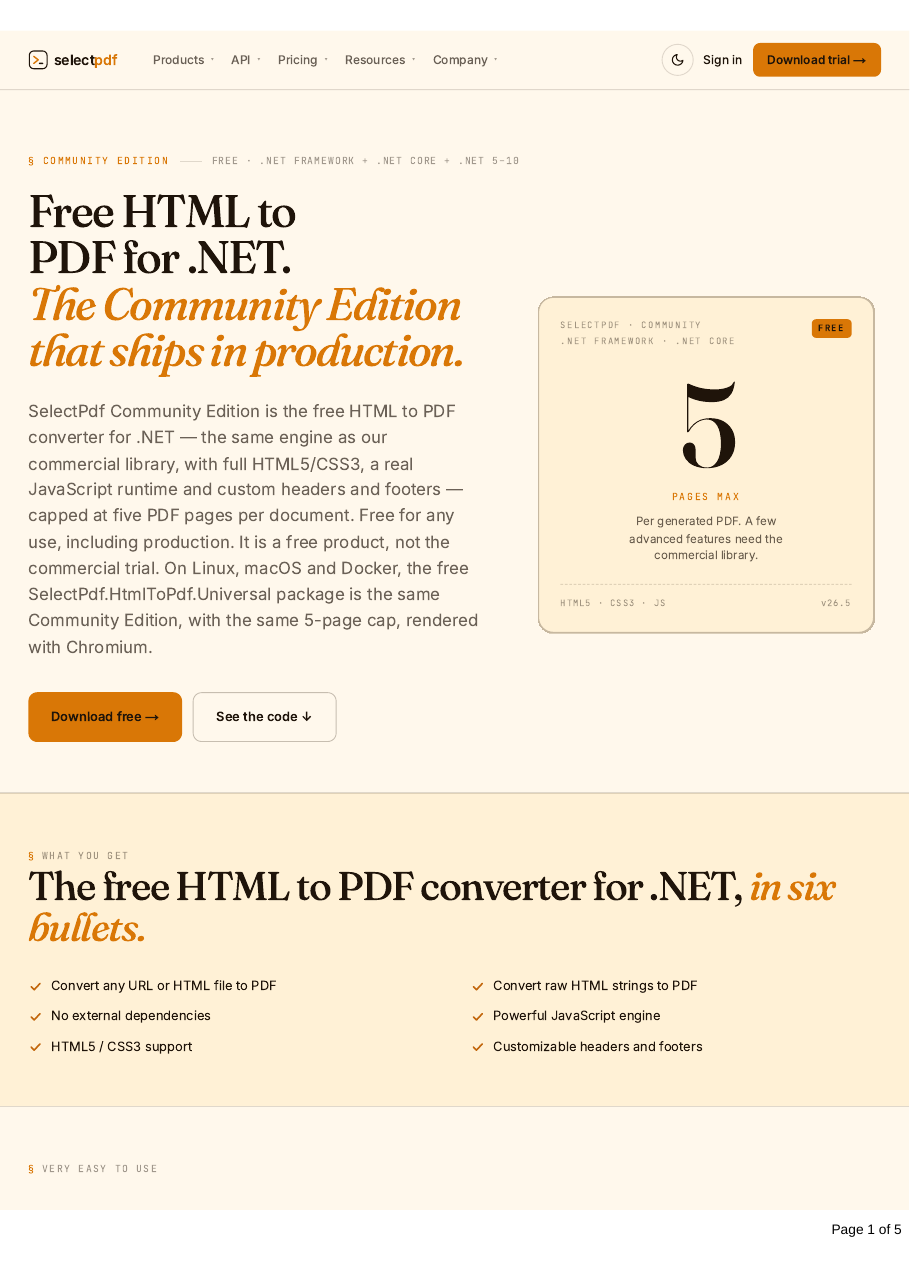
Download community-edition.pdf ↓ the file this sample produced, unedited
Common problems and fixes.
The PDF stops after page 5
That is the Community Edition's limit. The commercial SelectPdf.Universal library has no page limit; switch the package and keep the code.
A class such as PdfSecurityManager or PdfToText is missing
Working with existing PDFs (loading, editing, merging, signing), PDF to text, PDF to image and form filling are in the commercial library only. The free edition converts HTML and URLs to new PDFs.
The engine package for my platform
Add the engine package for the platform the app runs on (the install tabs list them), one per build. Alternatively, install one package that brings both: SelectPdf.HtmlToPdf.Windows, SelectPdf.HtmlToPdf.Linux, SelectPdf.HtmlToPdf.Linux.Arm64 or SelectPdf.HtmlToPdf.MacOS.
Text shows as boxes on Linux
The server has no fonts for that script. Arial, Times New Roman and Courier New are covered by the built-in Liberation fonts; for CJK, Arabic and other scripts see the fonts on Linux guide.
Good to know.
- SelectPdf.HtmlToPdf.Universal is the free Community Edition of the SelectPdf HTML to PDF converter for .NET, free for personal and commercial use, on Linux x64 and ARM64, Docker, Windows and macOS on Apple Silicon. Source
- The Community Edition generates PDF documents up to five pages long; it is a free product, not the commercial trial. Source
- HtmlToPdfResult.PdfPageCountBeforeLimit is the number of pages the conversion produced before the 5-page limit was applied; in the full edition it always equals PdfPageCount. Source
- The free edition includes custom headers and footers, page settings, HTTP headers and cookies, authentication, and HTML5, CSS3 and web fonts. Source
- Loading and modifying existing PDFs, PDF to text, PDF to image and form filling need the commercial library. Source
Questions, answered.
Short answers about this guide. The SelectPdf.Universal documentation covers every class and option.