HTML headers and footers with a logo and the date in C#
Turn on the converter's header and footer, then add a PdfHtmlSection to each: any HTML and CSS, here an SVG logo with a title at the top and the generation date at the bottom. They repeat on every page of the converted document.
Compiled and run: Linux ARM64 · Linux x64 · macOS ARM64 · Windows x64
Build it step by step.
-
1Install the NuGet packages
SelectPdf.Universalis the library. The native package carries the Chromium engine for one platform: add the one for the platform you run on.dotnet add package SelectPdf.Universal dotnet add package SelectPdf.Universal.Native.win-x64
dotnet add package SelectPdf.Universal
dotnet add package SelectPdf.Universal.Native.linux-x64
dotnet add package SelectPdf.Universal
dotnet add package SelectPdf.Universal.Native.linux-arm64
dotnet add package SelectPdf.Universal
dotnet add package SelectPdf.Universal.Native.osx-arm64
-
2Create a console app
Any .NET 8 or .NET 10 project works. To follow along, create a console app, run the install commands above inside its folder, then replace
Program.cswith the code below.dotnet new console -n PdfSample cd PdfSample
-
3Turn on the header
HtmlToPdf converter = new HtmlToPdf();

// header: a logo and a title, written in HTML
converter.Options.DisplayHeader = true;
converter.Header.Height = 60;
Options.DisplayHeaderenables the header, andHeader.Heightreserves 60 points at the top of every page for it. -
4Write the header in HTML
string header = """
    <div style="display: flex; align-items: center; gap: 16px; padding: 16px 40px;
                border-bottom: 3px solid #c2410c; font-family: sans-serif">
      <svg width="48" height="48" font-family="sans-serif" font-weight="bold" font-size="24">
        <rect width="48" height="48" rx="10" fill="#c2410c"/>
        <text x="24" y="33" fill="white" text-anchor="middle">A</text></svg>
      <span style="font-size: 28px; font-weight: bold">Acme Ltd. Sales report</span>
    </div>
    """;
converter.Header.Add(new PdfHtmlSection(header, ""));
The header is ordinary HTML and CSS: an inline SVG logo and the report title side by side with flexbox, above an orange rule. The logo is part of the HTML, so the sample needs no image file and no network.
new PdfHtmlSection(header, "")takes the HTML string and a base URL for relative paths (none here);Header.Addattaches it. -
5Put the date in the footer
// footer: the date the report was generated converter.Options.DisplayFooter = true; converter.Footer.Height = 40; string today = DateTime.Today.ToLongDateString(); converter.Footer.Add(new PdfHtmlSection( $"<div style='padding: 16px 40px; font: 20px sans-serif; color: #555'>Generated on {today}</div>", ""));Options.DisplayFooterandFooter.Heightdo the same at the bottom of the page. The footer is anotherPdfHtmlSection, with the date built in C# and placed in the HTML. Font sizes look large because the section's HTML is laid out 1024px wide and scaled down to the width of the page. -
6Convert a report that spans pages
// a report long enough for several pages
string rows = string.Concat(Enumerable.Range(1, 150).Select(i =>
    $"<tr><td>Order {1000 + i}</td><td>{i * 7 % 90 + 10} units</td></tr>"));
PdfDocument doc = converter.ConvertHtmlString(
    $"<body style='margin: 0 40px; font-family: sans-serif'><h1>Orders</h1><table width='400'>{rows}</table></body>");
doc.Save("report.pdf");
doc.Close();
150 orders fill several pages.
ConvertHtmlStringrenders the report, the header and footer are drawn on every page, andreport.pdfis saved. -
7Run it
dotnet run
The program writes
report.pdfto the working folder. Without a license key, every page carries a trial watermark; setGlobalProperties.LicenseKeybefore the first conversion to remove it.
The complete Program.cs.
This is the exact file our samples pipeline compiled and ran on Linux ARM64 and Linux x64 and macOS ARM64 and Windows x64 to produce the output on this page.
using SelectPdf.Universal;

HtmlToPdf converter = new HtmlToPdf();

// header: a logo and a title, written in HTML
converter.Options.DisplayHeader = true;
converter.Header.Height = 60;
string header = """
    <div style="display: flex; align-items: center; gap: 16px; padding: 16px 40px;
                border-bottom: 3px solid #c2410c; font-family: sans-serif">
      <svg width="48" height="48" font-family="sans-serif" font-weight="bold" font-size="24">
        <rect width="48" height="48" rx="10" fill="#c2410c"/>
        <text x="24" y="33" fill="white" text-anchor="middle">A</text></svg>
      <span style="font-size: 28px; font-weight: bold">Acme Ltd. Sales report</span>
    </div>
    """;
converter.Header.Add(new PdfHtmlSection(header, ""));

// footer: the date the report was generated
converter.Options.DisplayFooter = true;
converter.Footer.Height = 40;
string today = DateTime.Today.ToLongDateString();
converter.Footer.Add(new PdfHtmlSection(
    $"<div style='padding: 16px 40px; font: 20px sans-serif; color: #555'>Generated on {today}</div>", ""));

// a report long enough for several pages
string rows = string.Concat(Enumerable.Range(1, 150).Select(i =>
    $"<tr><td>Order {1000 + i}</td><td>{i * 7 % 90 + 10} units</td></tr>"));
PdfDocument doc = converter.ConvertHtmlString(
    $"<body style='margin: 0 40px; font-family: sans-serif'><h1>Orders</h1><table width='400'>{rows}</table></body>");
doc.Save("report.pdf");
doc.Close();
Open the project on GitHub → this program and the variations below, ready to dotnet run
The PDF it produces.
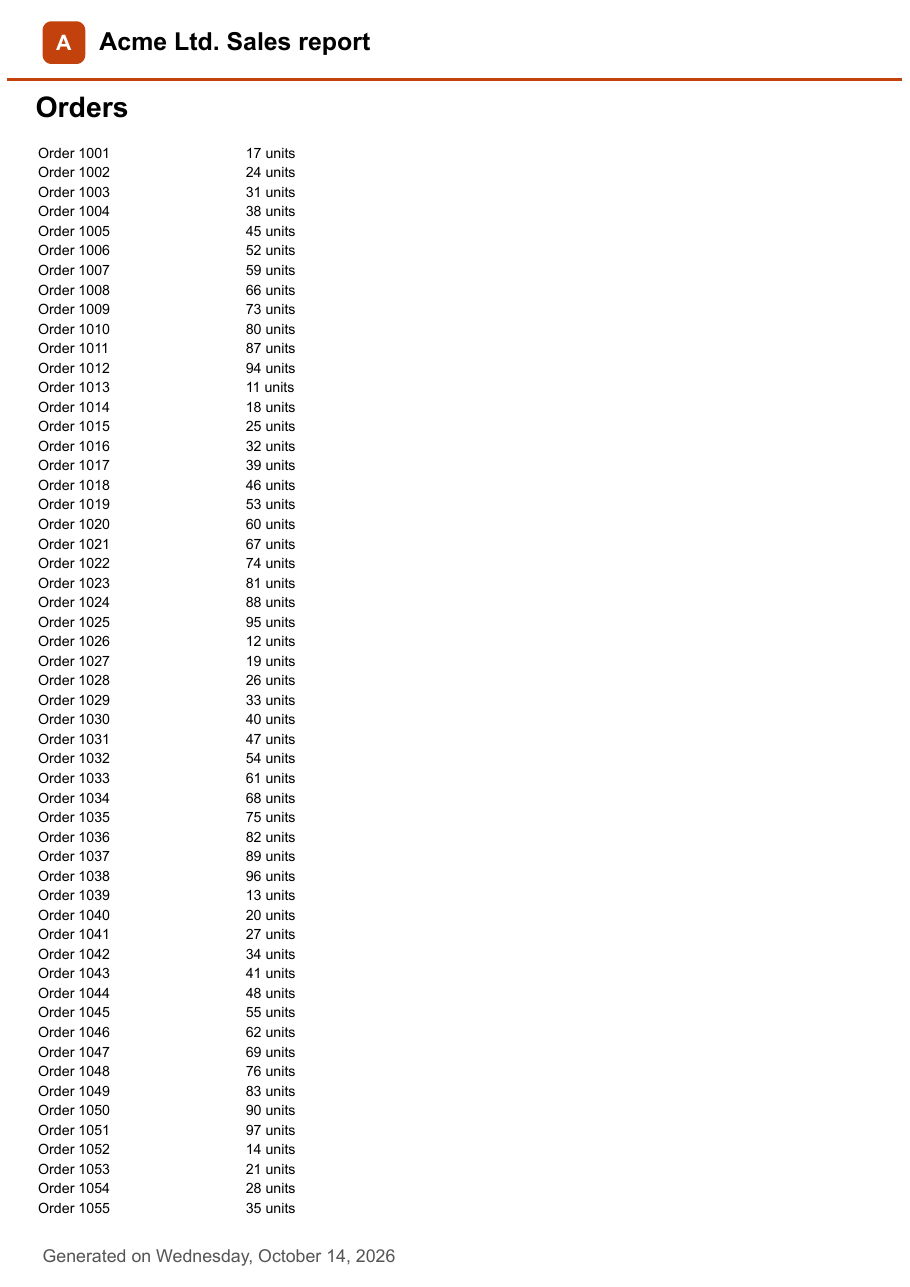
Download report.pdf ↓ the file this sample produced, unedited
Variations you will need next.
Each variation is a separate file in the same project, compiled and run with the program above.
Load the header from an HTML file or URL
new PdfHtmlSection(url) renders a web page into the header. Keep the header in its own HTML file next to your other templates and pass its file:// URL, or pass an https:// URL to a header your web app serves.
using SelectPdf.Universal;

static class HeaderFromFile
{
    public static void Run()
    {
        // the header lives in its own HTML file, maintained with the rest of your templates
        File.WriteAllText("header.html", """
            <div style="padding: 16px 40px; border-bottom: 3px solid #c2410c; font: bold 28px sans-serif">
              Acme Ltd. Sales report
            </div>
            """);

        HtmlToPdf converter = new HtmlToPdf();
        converter.Options.DisplayHeader = true;
        converter.Header.Height = 60;

        // a section built from a URL renders that page: here a file:// URL of the local file
        string url = new Uri(Path.GetFullPath("header.html")).AbsoluteUri;
        converter.Header.Add(new PdfHtmlSection(url));

        string rows = string.Concat(Enumerable.Range(1, 120).Select(i => $"<p>Line item {i}</p>"));
        PdfDocument doc = converter.ConvertHtmlString($"<h1>Report</h1>{rows}");
        doc.Save("header-from-file.pdf");
        doc.Close();
    }
}
Use a PNG logo with an image section
PdfImageSection draws an image from a stream or a file at a position in the header; given only a width, it keeps the image's proportions. A PdfTextSection next to it adds the title, without any HTML.
using SelectPdf.Universal;

static class ImageLogo
{
    public static void Run()
    {
        // a PNG logo; in your application read it from a file or an embedded resource
        byte[] logo = Convert.FromBase64String(
            "iVBORw0KGgoAAAANSUhEUgAAACAAAAAgCAIAAAD8GO2jAAAAKklEQVR42mM45MhDU8QwasGoBaMWjFowasGoBaMWjFowasGoBaMWDBULACVwPD2wuxyUAAAAAElFTkSuQmCC");

        HtmlToPdf converter = new HtmlToPdf();
        converter.Options.DisplayHeader = true;
        converter.Header.Height = 50;

        // image section: 30 points wide, height kept in proportion
        converter.Header.Add(new PdfImageSection(20, 10, 30, new MemoryStream(logo)));

        // text section next to it
        PdfTextSection title = new PdfTextSection(60, 18, "Acme Ltd. Sales report",
            PdfFont.CreateFromSystemFont("Liberation Sans", 14f));
        converter.Header.Add(title);

        string rows = string.Concat(Enumerable.Range(1, 120).Select(i => $"<p>Line item {i}</p>"));
        PdfDocument doc = converter.ConvertHtmlString($"<h1>Report</h1>{rows}");
        doc.Save("image-logo.pdf");
        doc.Close();
    }
}
A different header on the first page
After the conversion, PdfPage.CustomHeader replaces the document header on one page. The template from doc.AddTemplate is as wide as the page and as tall as Header.Height, and a PdfHtmlElement fills it with a colored title band; every other page keeps the plain header.
using SelectPdf.Universal;

static class FirstPageHeader
{
    public static void Run()
    {
        HtmlToPdf converter = new HtmlToPdf();
        converter.Options.DisplayHeader = true;
        converter.Header.Height = 60;
        converter.Header.Add(new PdfHtmlSection(
            "<div style='padding: 20px 40px; font: 20px sans-serif; color: #555'>Acme Ltd. Sales report</div>", ""));

        string rows = string.Concat(Enumerable.Range(1, 120).Select(i => $"<p>Line item {i}</p>"));
        PdfDocument doc = converter.ConvertHtmlString($"<h1>Report</h1>{rows}");

        // page 1 gets its own header: a template as wide as the page and as tall as the header
        PdfPage first = doc.Pages[0];
        PdfTemplate cover = doc.AddTemplate(first.PageSize.Width, 60);
        cover.Add(new PdfHtmlElement(
            "<div style='padding: 12px 40px; background: #c2410c; color: white; font: bold 32px sans-serif'>" +
            "Acme Ltd. Sales report</div>", ""));
        first.CustomHeader = cover;

        doc.Save("first-page-header.pdf");
        doc.Close();
    }
}
Common problems and fixes.
The header or footer does not appear
Adding sections to converter.Header is not enough: converter.Options.DisplayHeader must be true too, and Options.DisplayFooter for the footer.
The text in the header is too small
The section's HTML is laid out at a web page width of 1024px and scaled to the width of the page, so CSS sizes come out smaller in the PDF. Use larger sizes in the HTML, or a smaller WebPageWidth on the PdfHtmlSection.
The header HTML does not fit in the header
Header.Height is the height of the header in points. Make it tall enough for the scaled HTML, padding included; Footer.Height sets the footer the same way.
Images with relative paths do not load
The second argument of new PdfHtmlSection(html, baseUrl) is the base URL used to resolve relative paths in the HTML string. Pass the folder or site the images come from, or embed them in the HTML as the logo here is.
Good to know.
- Headers and footers can hold text (PdfTextSection), images (PdfImageSection) and HTML (PdfHtmlSection). Source
- If Options.DisplayHeader is false, the header is not displayed and all the options set for it have no effect. The footer works the same way with Options.DisplayFooter. Source
- A PdfHtmlSection is created from a URL or from an HTML string, with a base URL that resolves relative paths in the HTML. Source
- The section's HTML is laid out at a web page width of 1024px by default and scaled so that this width fills the width of the section. Source
- After the conversion, a single page can replace the document header with its own template through PdfPage.CustomHeader, or hide it with PdfPage.DisplayHeader. Source
Questions, answered.
Short answers about this guide. The SelectPdf.Universal documentation covers every class and option.