Generate an invoice PDF from an HTML template in C#
An invoice is data poured into a layout. Keep the layout as an HTML template with CSS, fill in the customer, the line items and the total from your data, and let HtmlToPdf turn the result into an A4 PDF.
Compiled and run: Linux ARM64 · Linux x64 · macOS ARM64 · Windows x64
Build it step by step.
-
1Install the NuGet packages
SelectPdf.Universalis the library. The native package carries the Chromium engine for one platform: add the one for the platform you run on.dotnet add package SelectPdf.Universal dotnet add package SelectPdf.Universal.Native.win-x64
dotnet add package SelectPdf.Universal
dotnet add package SelectPdf.Universal.Native.linux-x64
dotnet add package SelectPdf.Universal
dotnet add package SelectPdf.Universal.Native.linux-arm64
dotnet add package SelectPdf.Universal
dotnet add package SelectPdf.Universal.Native.osx-arm64
-
2Create a console app
Any .NET 8 or .NET 10 project works. To follow along, create a console app, run the install commands above inside its folder, then replace
Program.cswith the code below.dotnet new console -n PdfSample cd PdfSample
-
3Import the namespaces
using System.Net;
using System.Text;
using SelectPdf.Universal;
System.NetprovidesWebUtility.HtmlEncode,System.TexttheStringBuilderfor the rows, andSelectPdf.Universalthe converter. -
4Get the invoice data
// 1. The invoice data. In your application it comes from your database.
Invoice invoice = new Invoice("2026-118", new DateOnly(2026, 10, 17), "Fabrikam Ltd", "12 King Street, London",
[
    new InvoiceLine("Reporting service, October 2026", 1, 1200.00m),
    new InvoiceLine("Additional user licenses", 5, 40.00m),
    new InvoiceLine("Onboarding workshop", 1, 450.00m),
]);
An
Invoicerecord with its customer and line items, declared at the end of the file. In your application this comes from your database or order system. -
5Write the HTML template
// 2. The HTML template: plain HTML and CSS, with {{placeholders}} for the data.
string template = """
    <html><head><style>
      body { font-family: sans-serif; color: #222; }
      .top { display: flex; justify-content: space-between; }
      table { width: 100%; border-collapse: collapse; margin-top: 30px; }
      th { background: #1d4ed8; color: #fff; text-align: left; padding: 8px; }
      td { border-bottom: 1px solid #ddd; padding: 8px; }
      .num { text-align: right; }
      .total td { font-weight: bold; border: none; }
    </style></head><body>
      <div class="top">
        <div><h1>Invoice {{number}}</h1><p>Date: {{date}}</p></div>
        <div><b>Example Ltd</b><br>1 Market Road, Leeds<br>VAT GB 123 4567 89</div>
      </div>
      <p><b>Bill to:</b><br>{{customer}}<br>{{address}}</p>
      <table>
        <thead><tr><th>Description</th><th class="num">Qty</th>
          <th class="num">Unit price</th><th class="num">Amount</th></tr></thead>
        <tbody>{{rows}}</tbody>
        <tr class="total"><td colspan="3" class="num">Total due (GBP)</td><td class="num">{{total}}</td></tr>
      </table>
      <p>Payment within 30 days to account 12345678, sort code 01-02-03.</p>
    </body></html>
    """;
The layout is plain HTML and CSS: a flexbox header with the seller's details on the right, a styled table for the lines and a bold total row.
{{number}},{{rows}}and the other placeholders mark where the data goes. The converter renders it the way Chromium does, so you can design and preview the template in a browser. -
6Fill in the template
// 3. Fill in the template, HTML-encoding every value, one table row per line.
StringBuilder rows = new StringBuilder();
foreach (InvoiceLine line in invoice.Lines)
    rows.Append($"""
        <tr><td>{WebUtility.HtmlEncode(line.Description)}</td><td class="num">{line.Quantity}</td>
        <td class="num">{line.UnitPrice:N2}</td><td class="num">{line.Amount:N2}</td></tr>
        """);
string html = template
    .Replace("{{number}}", WebUtility.HtmlEncode(invoice.Number))
    .Replace("{{date}}", invoice.Date.ToString("d MMMM yyyy"))
    .Replace("{{customer}}", WebUtility.HtmlEncode(invoice.Customer))
    .Replace("{{address}}", WebUtility.HtmlEncode(invoice.Address))
    .Replace("{{rows}}", rows.ToString())
    .Replace("{{total}}", invoice.Total.ToString("N2"));
Each line item becomes a table row, and
Replaceputs every value in its placeholder. Text from your data goes throughWebUtility.HtmlEncode, so a customer called "Smith & Sons" or a description with<cannot break the HTML. Amounts are formatted withN2. -
7Convert to an A4 PDF and save
// 4. Convert to an A4 PDF with margins and a document title, and save it. HtmlToPdf converter = new HtmlToPdf(); converter.Options.PdfPageSize = PdfPageSize.A4; converter.Options.MarginTop = 30; converter.Options.MarginBottom = 30; converter.Options.MarginLeft = 30; converter.Options.MarginRight = 30; converter.Options.PdfDocumentInformation.Title = $"Invoice {invoice.Number}"; PdfDocument doc = converter.ConvertHtmlString(html); doc.Save($"invoice-{invoice.Number}.pdf"); doc.Close();PdfPageSizeand the four margins (in points) set the page;PdfDocumentInformation.Titleis the title a PDF viewer shows.ConvertHtmlStringrenders the HTML andSavewritesinvoice-2026-118.pdf. To send the invoice by email or return it from a web API,doc.Save()without arguments returns the PDF as a byte array. -
8The data types
record InvoiceLine(string Description, int Quantity, decimal UnitPrice)
{
    public decimal Amount => Quantity * UnitPrice;
}

record Invoice(string Number, DateOnly Date, string Customer, string Address, InvoiceLine[] Lines)
{
    public decimal Total => Lines.Sum(line => line.Amount);
}
Two records hold the data;
AmountandTotalare computed, so the PDF always adds up. -
9Run it
dotnet run
The program writes
invoice-2026-118.pdfto the working folder. Without a license key, every page carries a trial watermark; setGlobalProperties.LicenseKeybefore the first conversion to remove it.
The complete Program.cs.
This is the exact file our samples pipeline compiled and ran on Linux ARM64 and Linux x64 and macOS ARM64 and Windows x64 to produce the output on this page.
using System.Net;
using System.Text;
using SelectPdf.Universal;

// 1. The invoice data. In your application it comes from your database.
Invoice invoice = new Invoice("2026-118", new DateOnly(2026, 10, 17), "Fabrikam Ltd", "12 King Street, London",
[
    new InvoiceLine("Reporting service, October 2026", 1, 1200.00m),
    new InvoiceLine("Additional user licenses", 5, 40.00m),
    new InvoiceLine("Onboarding workshop", 1, 450.00m),
]);

// 2. The HTML template: plain HTML and CSS, with {{placeholders}} for the data.
string template = """
    <html><head><style>
      body { font-family: sans-serif; color: #222; }
      .top { display: flex; justify-content: space-between; }
      table { width: 100%; border-collapse: collapse; margin-top: 30px; }
      th { background: #1d4ed8; color: #fff; text-align: left; padding: 8px; }
      td { border-bottom: 1px solid #ddd; padding: 8px; }
      .num { text-align: right; }
      .total td { font-weight: bold; border: none; }
    </style></head><body>
      <div class="top">
        <div><h1>Invoice {{number}}</h1><p>Date: {{date}}</p></div>
        <div><b>Example Ltd</b><br>1 Market Road, Leeds<br>VAT GB 123 4567 89</div>
      </div>
      <p><b>Bill to:</b><br>{{customer}}<br>{{address}}</p>
      <table>
        <thead><tr><th>Description</th><th class="num">Qty</th>
          <th class="num">Unit price</th><th class="num">Amount</th></tr></thead>
        <tbody>{{rows}}</tbody>
        <tr class="total"><td colspan="3" class="num">Total due (GBP)</td><td class="num">{{total}}</td></tr>
      </table>
      <p>Payment within 30 days to account 12345678, sort code 01-02-03.</p>
    </body></html>
    """;

// 3. Fill in the template, HTML-encoding every value, one table row per line.
StringBuilder rows = new StringBuilder();
foreach (InvoiceLine line in invoice.Lines)
    rows.Append($"""
        <tr><td>{WebUtility.HtmlEncode(line.Description)}</td><td class="num">{line.Quantity}</td>
        <td class="num">{line.UnitPrice:N2}</td><td class="num">{line.Amount:N2}</td></tr>
        """);
string html = template
    .Replace("{{number}}", WebUtility.HtmlEncode(invoice.Number))
    .Replace("{{date}}", invoice.Date.ToString("d MMMM yyyy"))
    .Replace("{{customer}}", WebUtility.HtmlEncode(invoice.Customer))
    .Replace("{{address}}", WebUtility.HtmlEncode(invoice.Address))
    .Replace("{{rows}}", rows.ToString())
    .Replace("{{total}}", invoice.Total.ToString("N2"));

// 4. Convert to an A4 PDF with margins and a document title, and save it.
HtmlToPdf converter = new HtmlToPdf();
converter.Options.PdfPageSize = PdfPageSize.A4;
converter.Options.MarginTop = 30;
converter.Options.MarginBottom = 30;
converter.Options.MarginLeft = 30;
converter.Options.MarginRight = 30;
converter.Options.PdfDocumentInformation.Title = $"Invoice {invoice.Number}";
PdfDocument doc = converter.ConvertHtmlString(html);
doc.Save($"invoice-{invoice.Number}.pdf");
doc.Close();

record InvoiceLine(string Description, int Quantity, decimal UnitPrice)
{
    public decimal Amount => Quantity * UnitPrice;
}

record Invoice(string Number, DateOnly Date, string Customer, string Address, InvoiceLine[] Lines)
{
    public decimal Total => Lines.Sum(line => line.Amount);
}
Open the project on GitHub → this program and the variations below, ready to dotnet run
Supporting files.
invoice-template.html
<html>
<head><link rel="stylesheet" href="invoice.css"></head>
<body>
  <h1>Invoice {{number}}</h1>
  <p class="customer">Bill to: {{customer}}</p>
  <p class="total">Total due: {{total}} GBP</p>
</body>
</html>
invoice.css
body { font-family: sans-serif; margin: 40px; }
h1 { color: #1d4ed8; border-bottom: 3px solid #1d4ed8; padding-bottom: 8px; }
.customer { font-size: 18px; }
.total { font-size: 24px; font-weight: bold; text-align: right; }
The PDF it produces.
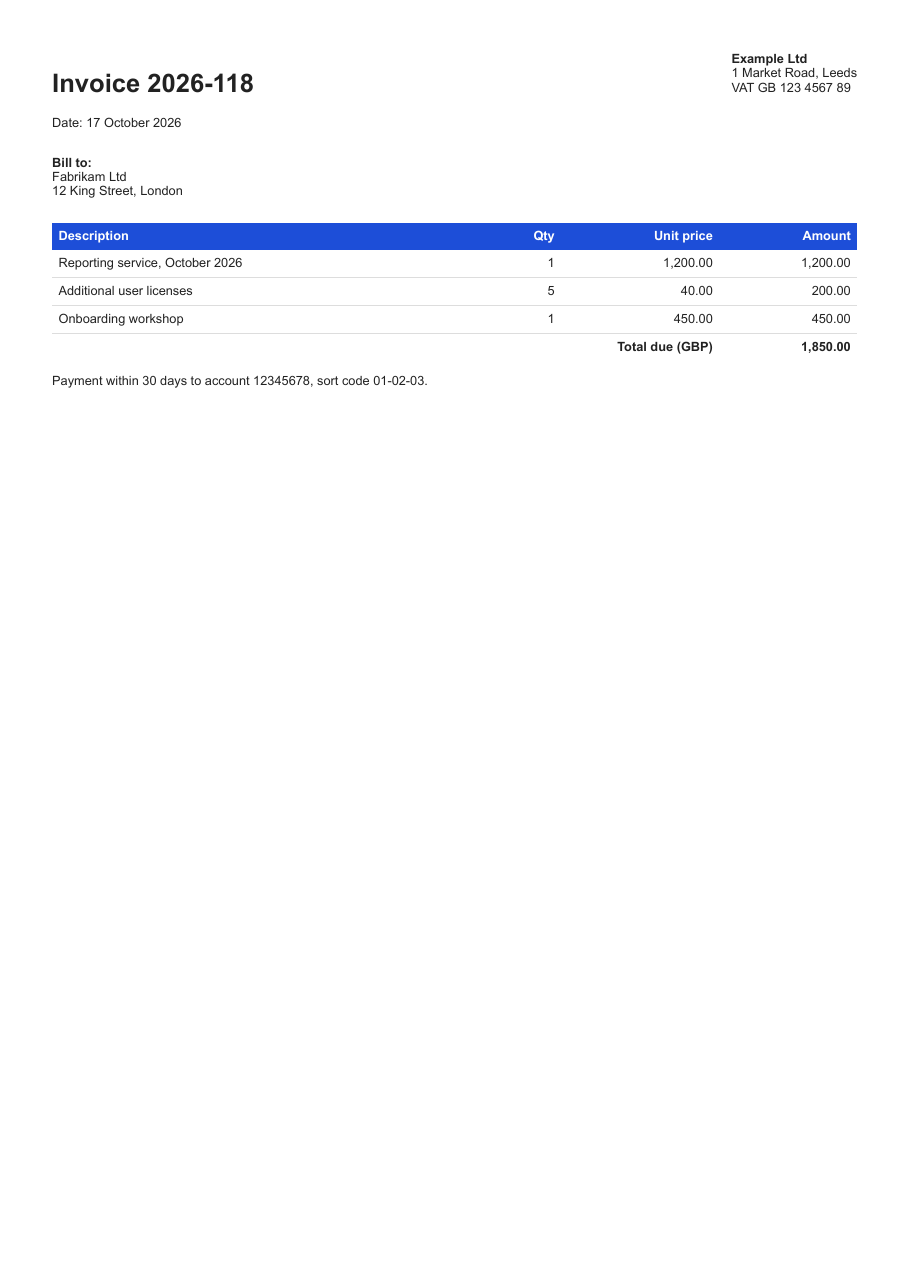
Download invoice-2026-118.pdf ↓ the file this sample produced, unedited
Variations you will need next.
Each variation is a separate file in the same project, compiled and run with the program above.
A long invoice: repeat the table header and number the pages
With 80 lines the table runs onto a second page. display: table-header-group on the thead, with CssMediaType = HtmlToPdfCssMediaType.Print, repeats the header row at the top of each page, and a footer PdfTextSection with {page_number} and {total_pages} prints "page 1 of 2".
using System.Text;
using SelectPdf.Universal;

static class LongInvoice
{
    public static void Run()
    {
        // 80 lines: the table runs over several pages
        StringBuilder rows = new StringBuilder();
        for (int i = 1; i <= 80; i++)
            rows.Append($"<tr><td>Support ticket #{4100 + i}</td><td class=\"num\">{i % 4 + 1}</td><td class=\"num\">75.00</td></tr>");

        string html = $$"""
            <style>
              body { font-family: sans-serif; }
              table { width: 100%; border-collapse: collapse; }
              th { background: #1d4ed8; color: #fff; text-align: left; padding: 6px; }
              td { border-bottom: 1px solid #ddd; padding: 6px; }
              .num { text-align: right; }
            </style>
            <h1>Invoice 2026-119</h1>
            <table>
              <thead style="display: table-header-group">
                <tr><th>Item</th><th class="num">Hours</th><th class="num">Rate</th></tr>
              </thead>
              <tbody>{{rows}}</tbody>
            </table>
            """;

        HtmlToPdf converter = new HtmlToPdf();
        // the table header repeats on every page when rendered with the print media type
        converter.Options.CssMediaType = HtmlToPdfCssMediaType.Print;

        // "Page X of Y" in the footer of every page
        converter.Options.DisplayFooter = true;
        converter.Footer.Height = 30;
        PdfTextSection pageNumbers = new PdfTextSection(0, 8, "Invoice 2026-119, page {page_number} of {total_pages}",
            PdfFont.CreateFromSystemFont("Liberation Sans", 9f));
        pageNumbers.HorizontalAlign = PdfTextHorizontalAlign.Right;
        converter.Footer.Add(pageNumbers);

        PdfDocument doc = converter.ConvertHtmlString(html);
        doc.Save("invoice-2026-119.pdf");
        doc.Close();
    }
}
Keep the template and its stylesheet in files
The template is invoice-template.html and it links invoice.css by a relative path, so a designer can change the layout without touching code. The second argument of ConvertHtmlString is the base URL, here the program's folder, against which invoice.css and any images are resolved.
using System.Net;
using SelectPdf.Universal;

static class TemplateFromFiles
{
    public static void Run()
    {
        // the template and its stylesheet are files a designer can edit;
        // the base URL lets the HTML load invoice.css by a relative path
        string folder = Path.GetFullPath(".") + Path.DirectorySeparatorChar;
        string html = File.ReadAllText("invoice-template.html")
            .Replace("{{number}}", WebUtility.HtmlEncode("2026-120"))
            .Replace("{{customer}}", WebUtility.HtmlEncode("Northwind Traders & Co"))
            .Replace("{{total}}", 980.00m.ToString("N2"));

        HtmlToPdf converter = new HtmlToPdf();
        PdfDocument doc = converter.ConvertHtmlString(html, new Uri(folder).AbsoluteUri);
        doc.Save("invoice-2026-120.pdf");
        doc.Close();
    }
}
Common problems and fixes.
Images or the stylesheet are missing
An HTML string has no address of its own, so relative paths cannot be resolved. Pass a base URL as the second argument of ConvertHtmlString, use absolute URLs, or embed small images as data URIs.
The table header appears only on the first page
Set display: table-header-group on the thead and Options.CssMediaType = HtmlToPdfCssMediaType.Print; with the default screen media type the header is not repeated.
Customer data breaks the layout
Encode every value that comes from your data with WebUtility.HtmlEncode before putting it in the HTML. Only the rows you build yourself, from encoded values, go in unencoded.
Amounts or dates use the wrong format
ToString("N2") and date formats follow the current culture of the process. Pass a CultureInfo, for example invoice.Total.ToString("N2", CultureInfo.GetCultureInfo("en-GB")), to fix the format for every server.
Good to know.
- HtmlToPdf converts any HTML string to PDF with ConvertHtmlString; the converter supports HTML5 and CSS3. Source
- ConvertHtmlString(html, baseUrl) resolves relative URLs of images and stylesheets against the base URL. Source
- Page size, orientation and margins are set with PdfPageSize, PdfPageOrientation and MarginLeft, MarginRight, MarginTop, MarginBottom; margins are in points. Source
- display: table-header-group on the thead repeats a table's header at the top of every page, when the page is rendered with the print media type. Source
- PdfDocument.Save() without arguments returns the PDF as a byte array. Source
Questions, answered.
Short answers about this guide. The SelectPdf.Universal documentation covers every class and option.