Validate PDF/A compliance in C# and fix what fails
PdfValidator.Validate checks an existing PDF against a standard such as PDF/A-2b and returns a ValidationReport: whether the document complies, and each failed rule with the object that fails it. PdfPreflight.Fix then fixes what it can and validates the result again.
Compiled and run: Linux x64 · Windows x64
Validated by veraPDF: PDF/A-2b · PDF/UA-1
Build it step by step.
-
1Install the NuGet packages
SelectPdf.Universalis the library. The native package carries the Chromium engine for one platform: add the one for the platform you run on.dotnet add package SelectPdf.Universal dotnet add package SelectPdf.Universal.Native.win-x64
dotnet add package SelectPdf.Universal
dotnet add package SelectPdf.Universal.Native.linux-x64
dotnet add package SelectPdf.Universal
dotnet add package SelectPdf.Universal.Native.linux-arm64
dotnet add package SelectPdf.Universal
dotnet add package SelectPdf.Universal.Native.osx-arm64
-
2Create a console app
Any .NET 8 or .NET 10 project works. To follow along, create a console app, run the install commands above inside its folder, then replace
Program.cswith the code below.dotnet new console -n PdfSample cd PdfSample
-
3Read the PDF
// the PDF to check: an ordinary PDF, made with no archiving standard in mind byte[] pdf = File.ReadAllBytes("annual-report.pdf");PdfValidatorandPdfPreflighttake the document as a byte array.annual-report.pdfis an ordinary PDF, made with no archiving standard in mind; read your own file here. -
4Validate it against PDF/A-2b
// 1. validate it against PDF/A-2b; the file is only read, never changed ValidationReport report = PdfValidator.Validate(pdf, null, PdfConformanceStandard.PdfA2B); Console.WriteLine($"PDF/A-2b: {(report.IsCompliant ? "compliant" : "not compliant")}, " + $"{report.ChecksPassed} checks passed, {report.ChecksFailed} failed");PdfValidator.Validatechecks every rule of the standard and returns aValidationReport. The second argument is the password of an encrypted document, null otherwise.IsCompliantis true when every check passed and the validation was complete;ChecksPassedandChecksFailedcount the checks. Here the report is not compliant, with 79 failed checks. -
5Read the failed rules
// one line per failed rule, with where its first failing object is foreach (var rule in report.Failures.GroupBy(failure => failure.Rule)) { RuleFailure first = rule.First(); string where = first.Page is int page ? $"page {page}" : first.Context; Console.WriteLine($" {rule.Key} ({rule.Count()}x): {first.Message} [{where}]"); }Failureslists each failed check as aRuleFailure:Rule(printed asISO 19005-2 6.2.4.3-2: specification, clause and test number),Description(what the rule requires),Message(why the object fails it),Context(the object's path in the document),PageandObjectNumber. Grouped by rule, the report shows three problems: no file identifier in the trailer, no XMP metadata, and color in DeviceRGB without an RGB output intent, 77 times on page 1. At most 100 failures are listed per rule by default. -
6Fix the document
// 2. fix it for PDF/A-2b; the fixed document is validated again PreflightResult result = PdfPreflight.Fix(pdf, null, PdfConformanceStandard.PdfA2B); foreach (PreflightFix fix in result.Applied) Console.WriteLine($"Fixed: {fix.Description}");PdfPreflight.Fixvalidates the document first and returns it as it is when it conforms already; otherwise it applies the fixes for what it fails. For PDF/A the document is converted to the level you ask for, any part from PDF/A-1 to PDF/A-4.Appliedlists eachPreflightFixwith itsDescriptionandCount; here there is one, Converted to PDF/A-2b. -
7Save the fixed document when it conforms
// 3. keep the fixed document only when it now conforms Console.WriteLine($"After the fix: {(result.After.IsCompliant ? "compliant" : "not compliant")}"); foreach (RuleFailure failure in result.After.Failures) Console.WriteLine($" still failing: {failure.Rule}: {failure.Message}"); if (result.After.IsCompliant) File.WriteAllBytes("annual-report-pdfa2b.pdf", result.Pdf);Afteris theValidationReportof the fixed document andPdfholds its bytes. What a fix could not correct is left inAfter.Failures. Here the fixed document is compliant and is written toannual-report-pdfa2b.pdf. -
8Run it
dotnet run
The program writes
annual-report-pdfa2b.pdfto the working folder. Without a license key, every page carries a trial watermark; setGlobalProperties.LicenseKeybefore the first conversion to remove it.
The complete Program.cs.
This is the exact file our samples pipeline compiled and ran on Linux x64 and Windows x64 to produce the output on this page.
using SelectPdf.Universal;

// the PDF to check: an ordinary PDF, made with no archiving standard in mind
byte[] pdf = File.ReadAllBytes("annual-report.pdf");

// 1. validate it against PDF/A-2b; the file is only read, never changed
ValidationReport report = PdfValidator.Validate(pdf, null, PdfConformanceStandard.PdfA2B);
Console.WriteLine($"PDF/A-2b: {(report.IsCompliant ? "compliant" : "not compliant")}, " +
    $"{report.ChecksPassed} checks passed, {report.ChecksFailed} failed");

// one line per failed rule, with where its first failing object is
foreach (var rule in report.Failures.GroupBy(failure => failure.Rule))
{
    RuleFailure first = rule.First();
    string where = first.Page is int page ? $"page {page}" : first.Context;
    Console.WriteLine($"  {rule.Key} ({rule.Count()}x): {first.Message} [{where}]");
}

// 2. fix it for PDF/A-2b; the fixed document is validated again
PreflightResult result = PdfPreflight.Fix(pdf, null, PdfConformanceStandard.PdfA2B);
foreach (PreflightFix fix in result.Applied)
    Console.WriteLine($"Fixed: {fix.Description}");

// 3. keep the fixed document only when it now conforms
Console.WriteLine($"After the fix: {(result.After.IsCompliant ? "compliant" : "not compliant")}");
foreach (RuleFailure failure in result.After.Failures)
    Console.WriteLine($"  still failing: {failure.Rule}: {failure.Message}");
if (result.After.IsCompliant)
    File.WriteAllBytes("annual-report-pdfa2b.pdf", result.Pdf);
Open the project on GitHub → this program and the variations below, ready to dotnet run
The PDF it produces.
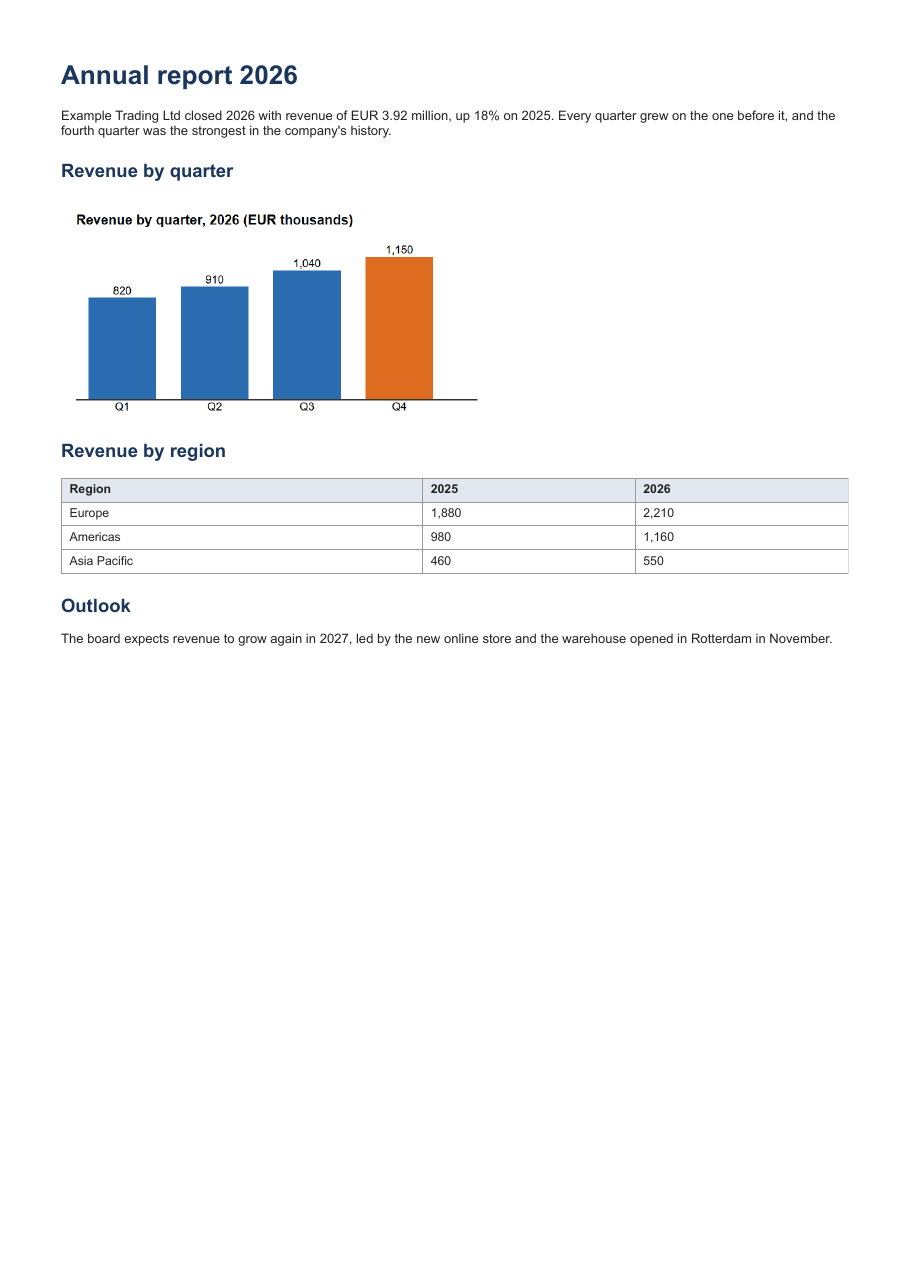
Download annual-report-pdfa2b.pdf ↓ the file this sample produced, unedited
Variations you will need next.
Each variation is a separate file in the same project, compiled and run with the program above.
Check a file at the level it declares
PdfValidator.ClaimedStandard returns the standard a file claims in its metadata: its PDF/A identification, else its PDF/UA one, else the PDF/X version in its document information. It returns null when the file claims none. Here the original report claims no standard, and the fixed copy claims PDF/A-2b and passes it.
using SelectPdf.Universal;

static class ClaimedStandard
{
    public static void Run()
    {
        // check each file at the level it declares in its metadata
        foreach (string file in new[] { "annual-report.pdf", "annual-report-pdfa2b.pdf" })
        {
            byte[] pdf = File.ReadAllBytes(file);
            PdfConformanceStandard? claimed = PdfValidator.ClaimedStandard(pdf, null);
            if (claimed == null)
            {
                Console.WriteLine($"{file}: claims no standard");
                continue;
            }

            ValidationReport report = PdfValidator.Validate(pdf, null, claimed.Value);
            Console.WriteLine($"{file}: claims {claimed}, " +
                (report.IsCompliant ? "compliant" : $"not compliant, {report.ChecksFailed} checks failed"));
        }
    }
}
Fix for PDF/UA-1, then add what needs a person
Fixing for PdfConformanceStandard.PdfUA1 tags the untagged report (its headings, paragraphs, table and chart are recognized on the page), sets the language from PreflightOptions.Language, which is never guessed, and declares PDF/UA-1. The chart still has no alternative text, which needs a person, so After reports it under ISO 14289-1 7.3-1. PdfAccessibilityManager.MissingAlternateText finds the figure, AlternateText describes it, and the document then validates as PDF/UA-1.
using SelectPdf.Universal;

static class AccessiblePdfUA1
{
    public static void Run()
    {
        byte[] pdf = File.ReadAllBytes("annual-report.pdf");

        // tag the document for PDF/UA-1; the language is set from the options, never guessed
        PreflightResult result = PdfPreflight.Fix(pdf, null, PdfConformanceStandard.PdfUA1,
            new PreflightOptions(Language: "en-GB"));
        foreach (PreflightFix fix in result.Applied)
            Console.WriteLine($"Fixed: {fix.Description}");

        // what needs a person is still reported: the chart has no alternative text
        foreach (RuleFailure failure in result.After.Failures)
            Console.WriteLine($"Left for a person: {failure.Rule}: {failure.Message}");

        // describe the chart, the one figure without a description
        using PdfAccessibilityManager manager = new PdfAccessibilityManager();
        manager.Load(result.Pdf);
        PdfFigure chart = manager.MissingAlternateText[0];
        chart.AlternateText = "Bar chart of revenue by quarter in 2026, in thousands of euros: " +
            "Q1 820, Q2 910, Q3 1,040 and Q4 1,150.";
        byte[] described = manager.Save();

        // validate again
        ValidationReport report = PdfValidator.Validate(described, null, PdfConformanceStandard.PdfUA1);
        Console.WriteLine($"PDF/UA-1: {(report.IsCompliant ? "compliant" : "not compliant")}");
        if (report.IsCompliant)
            File.WriteAllBytes("annual-report-ua1.pdf", described);
    }
}
Limit the failures listed and the time taken
ValidationOptions sets the failures listed per rule (100 by default), the failures in all, and how long the validation may run, reading the file included (30 seconds by default). With MaxFailuresPerRule: 3 the report lists 5 failures, while ChecksFailed still counts all 79. With MaxFailures: 1 the validation stops at the first failure: Complete is false, and a report that is not complete is never compliant, which is all a yes-or-no check needs.
using SelectPdf.Universal;

static class ValidationLimits
{
    public static void Run()
    {
        byte[] pdf = File.ReadAllBytes("annual-report.pdf");

        // list at most 3 failures per rule, and give the validation 10 seconds
        var options = new ValidationOptions(MaxFailuresPerRule: 3, Timeout: TimeSpan.FromSeconds(10));
        ValidationReport report = PdfValidator.Validate(pdf, null, PdfConformanceStandard.PdfA2B, options);
        Console.WriteLine($"{report.Failures.Count} failures listed, {report.ChecksFailed} checks failed, " +
            $"complete: {report.Complete}");

        // a yes-or-no check: stop at the first failure
        ValidationReport quick = PdfValidator.Validate(pdf, null, PdfConformanceStandard.PdfA2B,
            new ValidationOptions(MaxFailures: 1));
        Console.WriteLine($"compliant: {quick.IsCompliant}, complete: {quick.Complete}, " +
            $"{quick.Failures.Count} failure listed");
        if (!quick.Complete)
            Console.WriteLine("The validation stopped early, so the report is not compliant.");
    }
}
Common problems and fixes.
Not compliant, but the report stopped early
When Complete is false the validation stopped at a time or size limit, or on a part of the file that could not be read, and the report is never compliant. For a very large document, raise the time limit: new ValidationOptions(Timeout: TimeSpan.FromMinutes(2)).
Fix throws TimeoutException
The whole fix, with the validation before and after it, runs within the timeout of PreflightOptions.Validation, 30 seconds by default. Raise it for very large documents: new PreflightOptions(Validation: new ValidationOptions(Timeout: TimeSpan.FromMinutes(2))).
A signed PDF is refused
Every fix rewrites the file, which the signature would no longer cover, so PdfPreflight.Fix refuses a digitally signed document. Fix the document before it is signed.
Embedded files are still reported after the fix
PDF/A-3 and PDF/A-4f keep embedded files. For the other levels, embedded files the level does not admit are removed only when PreflightOptions.RemoveAttachmentsAndJavaScript is set; otherwise they are kept and reported.
Good to know.
- PdfValidator checks an existing document against PDF/A (parts 1 to 4), PDF/UA (parts 1 and 2) and PDF/X (PDF/X-1a, PDF/X-3 and PDF/X-4). The document is only read, never changed. Source
- Each failed check is reported as a RuleFailure: the rule (its specification, clause and test number), what the rule requires, why the object fails it, and the object's path, page and object number. Source
- PDF/A and PDF/UA are checked with the validation profiles of the veraPDF project, and the results agree with veraPDF's on its test corpora. PDF/X is checked with rules written from the public descriptions of ISO 15930. Source
- A validation that stopped early, at a time or size limit or on a part of the file that could not be read, gives a report that is never compliant. The time limit is 30 seconds by default. Source
- PdfPreflight.Fix returns a document that conforms already as it is; otherwise it applies the fixes for what the document fails and validates the result again. A digitally signed document is refused. Source
- Validation and preflight are in the full library only and run on Windows, Linux and macOS. Source
Questions, answered.
Short answers about this guide. The SelectPdf.Universal documentation covers every class and option.