Convert Word documents to PDF/A for archiving in C#
Set PdfStandard on the Word to PDF converter's options to a PDF/A level, fill in the document metadata and convert the .docx file: the PDF is written to that archival standard, with every font the document uses embedded.
Compiled and run: Linux ARM64 · Linux x64 · macOS ARM64 · Windows x64
Validated by veraPDF: PDF/A-2b · PDF/A-4 · PDF/A-3a · PDF/UA-1
Build it step by step.
-
1Install the NuGet packages
SelectPdf.Universalis the library. The native package carries the Chromium engine for one platform: add the one for the platform you run on.dotnet add package SelectPdf.Universal dotnet add package SelectPdf.Universal.Native.win-x64
dotnet add package SelectPdf.Universal
dotnet add package SelectPdf.Universal.Native.linux-x64
dotnet add package SelectPdf.Universal
dotnet add package SelectPdf.Universal.Native.linux-arm64
dotnet add package SelectPdf.Universal
dotnet add package SelectPdf.Universal.Native.osx-arm64
-
2Create a console app
Any .NET 8 or .NET 10 project works. To follow along, create a console app, run the install commands above inside its folder, then replace
Program.cswith the code below.dotnet new console -n PdfSample cd PdfSample
-
3Create the converter
WordToPdf converter = new WordToPdf();
WordToPdfconverts Word documents. ItsOptions,HeaderandFootermirror the HTML converter's, so a document setup written forHtmlToPdfapplies here unchanged. -
4Choose the PDF/A level
// PDF/A-2b: archival output, with every font embedded
converter.Options.PdfStandard = PdfStandard.PdfA2B;
Options.PdfStandard = PdfStandard.PdfA2Bwrites the document as PDF/A-2b. The default,PdfStandard.Full, is a standard PDF with no conformance constraints. -
5Set the document metadata
// document metadata, written into the archived file
converter.Options.PdfDocumentInformation.Title = "Board meeting minutes, October 2026";
converter.Options.PdfDocumentInformation.Author = "Company secretary";
converter.Options.PdfDocumentInformation.Subject = "Minutes of the board meeting of 8 October 2026";
Options.PdfDocumentInformationsets the title, author and subject recorded in the generated document, so the archived file describes itself. -
6Convert and save
// the format is taken from the file extension PdfDocument doc = converter.ConvertFile("board-minutes.docx"); doc.Save("board-minutes-pdfa2b.pdf"); doc.Close();ConvertFiletakes the format from the file extension and returns aPdfDocument; by default every page keeps the size and orientation the Word document gives it.Savewritesboard-minutes-pdfa2b.pdfandClosereleases it. -
7Run it
dotnet run
The program writes
board-minutes-pdfa2b.pdfto the working folder. Without a license key, every page carries a trial watermark; setGlobalProperties.LicenseKeybefore the first conversion to remove it.
The complete Program.cs.
This is the exact file our samples pipeline compiled and ran on Linux ARM64 and Linux x64 and macOS ARM64 and Windows x64 to produce the output on this page.
using SelectPdf.Universal;

WordToPdf converter = new WordToPdf();

// PDF/A-2b: archival output, with every font embedded
converter.Options.PdfStandard = PdfStandard.PdfA2B;

// document metadata, written into the archived file
converter.Options.PdfDocumentInformation.Title = "Board meeting minutes, October 2026";
converter.Options.PdfDocumentInformation.Author = "Company secretary";
converter.Options.PdfDocumentInformation.Subject = "Minutes of the board meeting of 8 October 2026";

// the format is taken from the file extension
PdfDocument doc = converter.ConvertFile("board-minutes.docx");
doc.Save("board-minutes-pdfa2b.pdf");
doc.Close();
Open the project on GitHub → this program and the variations below, ready to dotnet run
The PDF it produces.
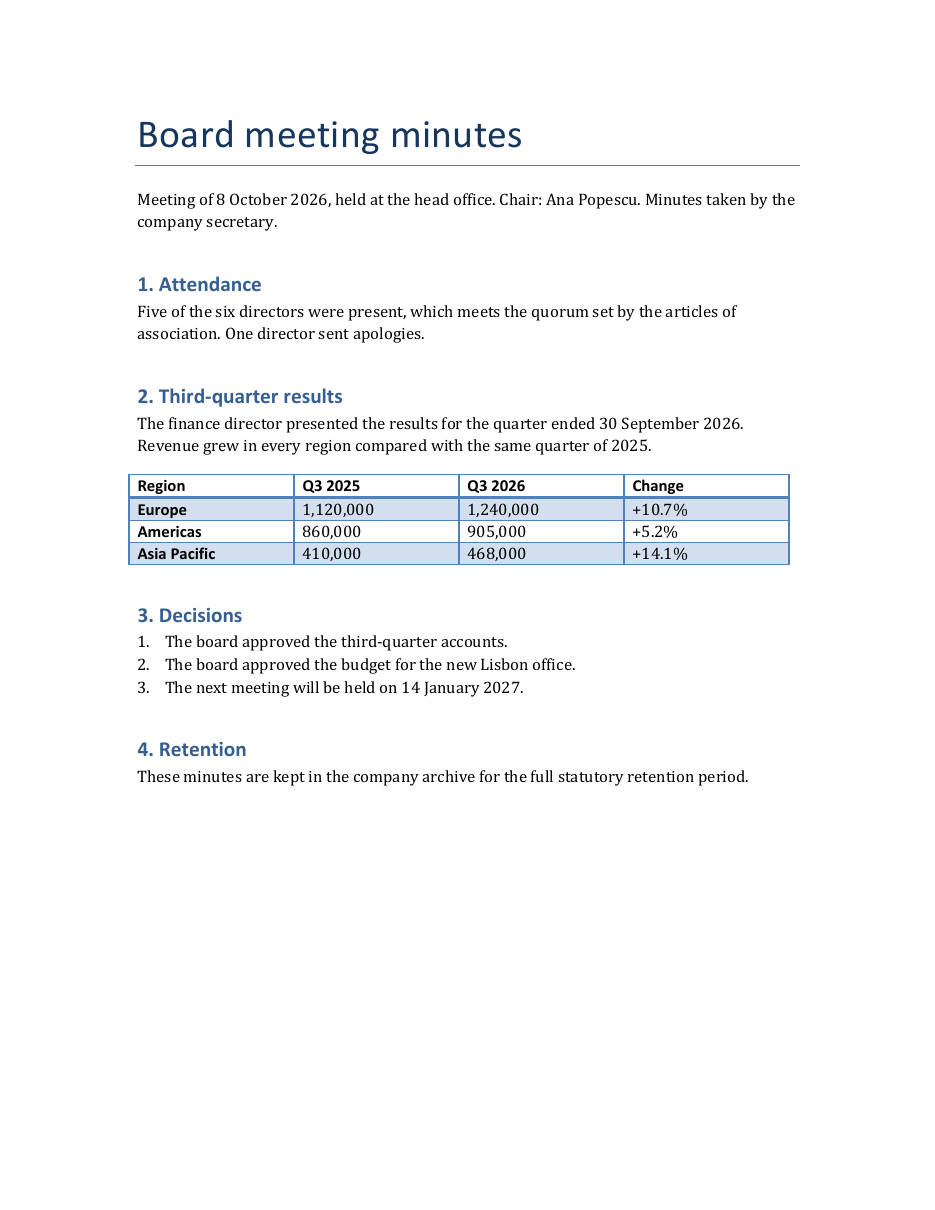
Download board-minutes-pdfa2b.pdf ↓ the file this sample produced, unedited
Variations you will need next.
Each variation is a separate file in the same project, compiled and run with the program above.
PDF/A-4, the level defined on PDF 2.0
PdfStandard.PdfA4 writes the document as PDF/A-4, which is defined on PDF 2.0. The same enumeration has PdfA (PDF/A-1b), PdfA3B, PdfA3U and PdfA3A, and the PDF/A-4 variants PdfA4E (engineering) and PdfA4F (arbitrary embedded files). Choose the level your archive or regulation names.
using SelectPdf.Universal;

static class PdfA4
{
    public static void Run()
    {
        WordToPdf converter = new WordToPdf();

        // PDF/A-4 is the archiving level defined on PDF 2.0
        converter.Options.PdfStandard = PdfStandard.PdfA4;
        converter.Options.PdfDocumentInformation.Title = "Board meeting minutes, October 2026";

        PdfDocument doc = converter.ConvertFile("board-minutes.docx");
        doc.Save("board-minutes-pdfa4.pdf");
        doc.Close();
    }
}
Archival and accessible: PDF/A-3a with PDF/UA-1
PdfStandard.PdfA3A turns tagging on by itself: the Word document's headings, paragraphs, lists and tables with their header cells become the logical structure of the PDF. AccessibilityStandard = PdfUAStandard.UA1 declares PDF/UA-1, which needs Title and Language. A picture without alternative text in the Word document is given the placeholder Image, so describe every picture in Word.
using SelectPdf.Universal;

static class AccessiblePdfA3a
{
    public static void Run()
    {
        WordToPdf converter = new WordToPdf();

        // PDF/A-3a is archival and accessible: it turns tagging on by itself
        converter.Options.PdfStandard = PdfStandard.PdfA3A;

        // declare PDF/UA-1, which needs a title and a language
        converter.Options.AccessibilityStandard = PdfUAStandard.UA1;
        converter.Options.Title = "Board meeting minutes, October 2026";
        converter.Options.Language = "en-US";

        PdfDocument doc = converter.ConvertFile("board-minutes.docx");
        doc.Save("board-minutes-pdfa3a-ua1.pdf");
        doc.Close();
    }
}
Merge several Word documents into one PDF/A file
Each .docx file is converted as PDF/A-2b, and Append adds its pages to an empty document created with new PdfDocument(PdfStandard.PdfA2B). A PDF/A target takes pages only from documents of the same PDF/A part with at least the same conformance, so every source is converted at the target's level. Close the sources after the merged document is saved.
using SelectPdf.Universal;

static class MergeDocxIntoPdfA
{
    public static void Run()
    {
        WordToPdf converter = new WordToPdf();
        converter.Options.PdfStandard = PdfStandard.PdfA2B;

        PdfDocument minutes = converter.ConvertFile("board-minutes.docx");
        PdfDocument resolution = converter.ConvertFile("board-resolution.docx");

        // the target declares PDF/A-2b and accepts only PDF/A-2 sources
        PdfDocument archive = new PdfDocument(PdfStandard.PdfA2B);
        archive.DocumentInformation.Title = "Board meeting of 8 October 2026";
        archive.Append(minutes);
        archive.Append(resolution);
        archive.Save("board-meeting-pdfa2b.pdf");

        archive.Close();
        minutes.Close();
        resolution.Close();
    }
}
Common problems and fixes.
WordToPdfException: the file cannot be found or read
ConvertFile throws WordToPdfException when the path is empty, the file does not exist, or the document cannot be read. A relative path is resolved against the current directory, so pass a full path, or read the file yourself and call ConvertStream or ConvertBytes.
The Word document is password protected
Set converter.Options.Password to the password of the encrypted Word document before converting it.
An error names the levels that can be used
Some archiving and accessibility levels do not combine: PDF/UA-1 combines with PDF/A-2 and PDF/A-3, PDF/UA-2 only with PDF/A-4, and PDF/A-1b with neither. Asking for another combination raises an error that names the levels that can be used instead.
Append throws when merging into a PDF/A document
A PDF/A target accepts only sources of the same PDF/A part with at least the same conformance. Convert every Word document at the target's level, or create the target with new PdfDocument() if it does not need to be PDF/A.
Good to know.
- The Word to PDF converter reads docx, docm, dotx, dotm, doc and dot files, plus rtf, plain text, WordML, html and markdown. Source
- Every PDF/A level and PDF/X-1a are produced by the Word to PDF converter through PdfStandard, the way the HTML converter produces them. Source
- Every font the Word document uses is embedded in the PDF; a font family the host does not have is served from the bundled Liberation faces, metric-compatible with Arial, Times New Roman and Courier New. Source
- PdfStandard.PdfA3A turns tagging on by itself and combines with PDF/UA-1; PDF/A-4 is the archiving level that combines with PDF/UA-2. Source
- A document created with a PDF/A standard takes pages only from documents of the same PDF/A part with at least the same conformance. Source
Questions, answered.
Short answers about this guide. The SelectPdf.Universal documentation covers every class and option.