Choosing a PDF library for .NET usually means reading vendor pages, running a hello world and hoping the result holds up on real documents. We wanted something more useful: ten C# PDF libraries put through the same 14 tasks, each with a compilable sample, and measured on the same machine under Windows and Linux for speed, throughput, memory, output correctness, fidelity to Chrome, PDF/A and PDF/UA output, and Docker deployment.
Everything is public: the harness, the 18 test pages, the raw results and every sample, so you can check any number or re-run it on your own hardware. This post explains how the measurements work, where each library comes out ahead (it is not the same library every time), and what the results can and cannot tell you.
Why PDF library comparisons mislead
Most comparisons you find measure one library on one page with its defaults, and the defaults differ more than you would expect. Some libraries print with print CSS media and drop backgrounds; some lay the page out at 1,024 pixels and scale it; some use Letter paper, others A4. One converts HTML with Chromium, another with its own layout engine that does not run JavaScript. A “hello world” timing tells you little about an invoice with web fonts, a chart drawn by script or a 40-page report.
So we built the comparison around the same work for everyone.
Fourteen tasks, one sample each
Every library gets one compilable console project per task: hello world, an HTML string, a URL, page size and margins, a header and footer with page numbers, merge, watermark, form filling, text extraction, PDF to image, a digital signature, PDF/A output, an ASP.NET Core endpoint and a Linux Docker deployment. A task a library cannot do is marked not supported, with a link to the vendor page that says so, instead of being left blank.
Each sample is built and run, and a checker opens the output: the PDF must open, have the expected number of pages and contain the expected text. Licences, prices, platforms and engine versions on each library page link to the vendor’s own page or the NuGet package, with the date they were checked.
The ten: ABCpdf, Docotic.Pdf, IronPDF, iText with pdfHTML, PDFsharp / MigraDoc, Playwright, PuppeteerSharp, QuestPDF, SelectPdf and wkhtmltopdf (through the Haukcode.WkHtmlToPdfDotNet wrapper).
How the harness measures
Each library runs behind a small adapter program, and one runner drives them all over the same 18 test pages: Bootstrap layouts, an invoice, web fonts, grid and flexbox, a chart drawn by JavaScript, lazy-loaded and large images, right-to-left and CJK text, a long document and more.
- Speed: 9 conversions per page in a warm process after a discarded warm-up, with the libraries interleaved (A, B, C, A, B, C…) so machine drift is spread out. Medians are reported, and the summary uses the geometric mean over the pages every HTML library converted.
- Throughput: conversions a minute for 60 seconds at 1, 4 and 8 at once, through the synchronous API and the asynchronous one.
- Memory: the proportional set size of the library’s whole process tree, so browser-based engines with many processes are counted fairly, plus 1,000 conversions in one process to see whether memory grows.
- Output: 48 content checks (text present, nothing cut off, fonts embedded, page numbers, bookmarks, form fields, encryption, isolation between conversions) and fidelity: each PDF is compared, tile by tile, with a Chrome screenshot of the same page using SSIM, with evaluation watermarks masked.
- Standards: every PDF/A and PDF/UA level a library offers is requested and validated twice by veraPDF; PDF/X-1a, which veraPDF does not cover, is checked structurally.
- Deployment: each published app runs in
mcr.microsoft.com/dotnet/runtime:8.0as root and as a non-root user, first with nothing added, then following the vendor’s own Docker instructions.
Windows and Linux on one machine
The run used one machine (Intel Core Ultra 9 275HX, 24 logical cores): Windows, and Ubuntu 24.04 under WSL2 on the same hardware. That keeps the two operating systems comparable with each other, but WSL2 is not a separate Linux server, and your production machine is not this one. Treat the numbers as relative, not as capacity planning.
Different libraries win different measures
There is no overall score, because the winners change from one measure to the next:
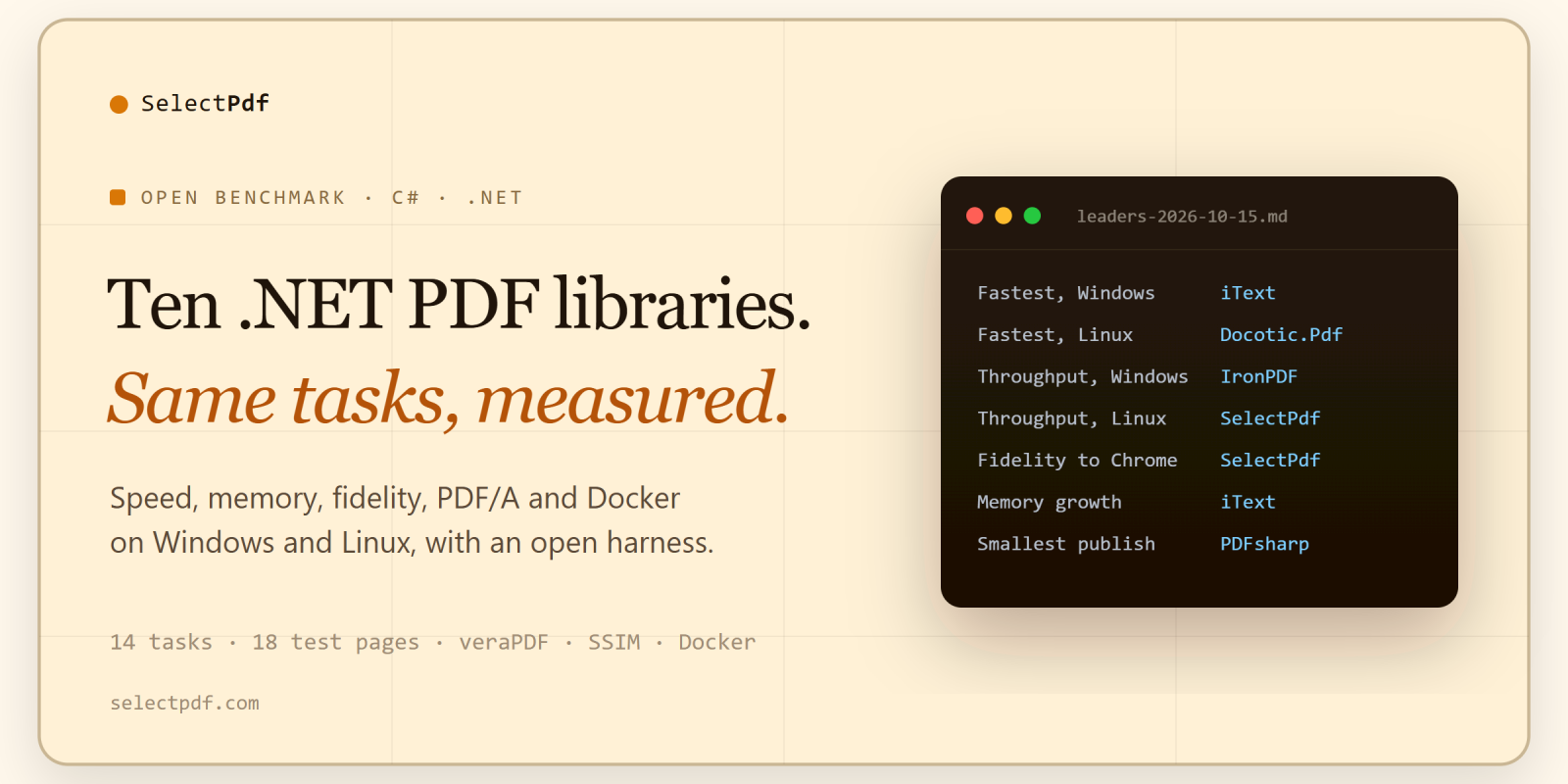
- Fastest HTML to PDF per page on Windows: iText (183 ms), just ahead of IronPDF (186 ms).
- Fastest per page on Linux: Docotic.Pdf (107 ms), with Playwright at 108 ms.
- Most conversions a minute with 8 at once: IronPDF on Windows (1,735), SelectPdf on Linux (2,597).
- Least memory growth over 1,000 conversions: iText on both systems.
- Smallest publish size: PDFsharp (2.1 MB on linux-x64).
- Most content checks passed, closest to Chrome, most PDF/A, PDF/UA and PDF/X levels valid, and most PDF tasks offered: SelectPdf (46 of 48, 0.984, 17 of 17, 11 of 11).
Some results are about deployment rather than speed. On the plain .NET runtime image, SelectPdf, iText, PDFsharp and QuestPDF ran as root and as a non-root user with nothing installed; ABCpdf, Docotic.Pdf and IronPDF needed the OS packages from their own instructions; Playwright, PuppeteerSharp and wkhtmltopdf did not run on the plain image.
The full tables, with every page and every failed check, are on the results page linked below. If you only need documents built in C# without HTML, QuestPDF or PDFsharp may be all you need; if you already run Playwright for end-to-end tests, printing with it may be enough. The point of publishing everything is that you can make that call yourself. The same summary, with each library’s licence and price, is on our C# PDF libraries compared page.
Re-run it
The harness needs the .NET 8 SDK, Python 3 and veraPDF. Libraries that need a trial key read it from an environment variable and are skipped without one.
./run.sh
./run.ps1
./run.ps1 -Linux
A full run takes about half an hour per operating system on an otherwise idle machine.
Limitations
- One machine and one run per operating system; Linux is WSL2, not a separate host.
- Commercial libraries run on their free trial or evaluation; watermarks are masked before images are compared.
- Each library is configured the way its vendor documents. If we got your library’s setup wrong, open an issue or a pull request: the adapter code for every library is in the harness repository, and corrections are welcome.
- The benchmark is maintained by a vendor whose library is included. Public code and raw data make it checkable; they do not make it independent.
Links
- Comparison, samples and library pages: https://github.com/csharp-pdf/pdf-libraries-compared
- Benchmark harness and methodology: https://github.com/csharp-pdf/pdf-benchmarks
- Full results of the 2026-10-15 run: https://github.com/csharp-pdf/pdf-libraries-compared/blob/main/benchmarks/2026-10-15.md