Verify and save PDF/A
for documents kept for years.
Archives, courts and public offices ask for PDF/A, the ISO standard for documents that must look the same for decades. SelectPdf PDF Editor checks a PDF against every part of it, shows what fails and where, and saves a PDF/A copy that it verifies as it saves.
Check against every PDF/A level.
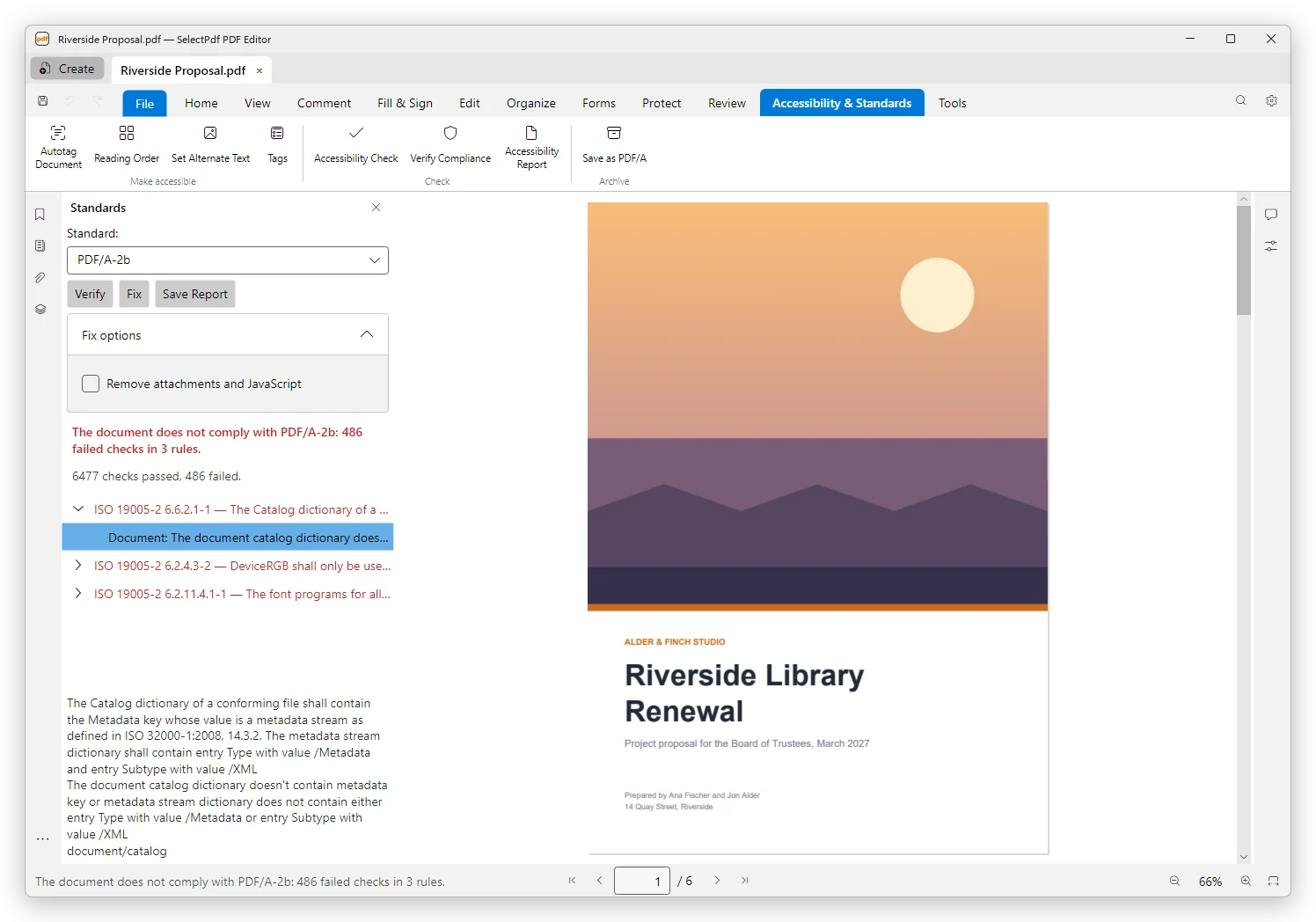
Verify Compliance checks a document against PDF/A-1a, 1b, 2a, 2b, 2u, 3a, 3b, 3u, PDF/A-4, 4e and 4f, and against PDF/UA-1, PDF/UA-2 and PDF/X too.
The panel says whether the document complies. Each failed rule comes with the clause of the standard, such as ISO 19005-2 6.2.11.4.1-1, what it requires, and where it failed: in the document, or on a page. A check that could not run to the end is never shown as compliant. Save Report keeps the result as a web page.
Free, on Windows and Mac.
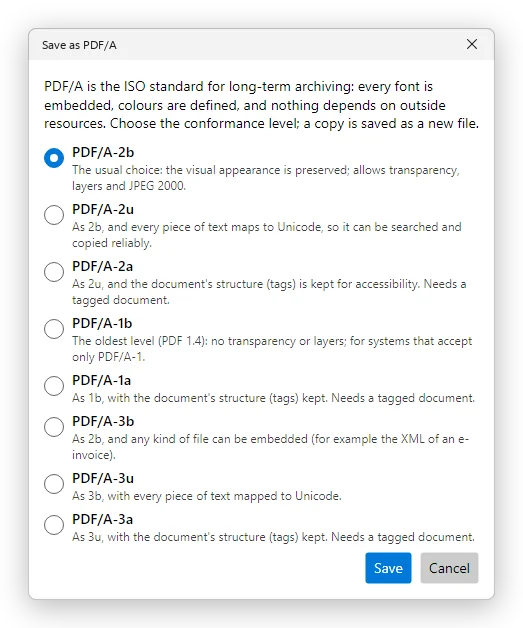
Save a copy as PDF/A.
Save as PDF/A writes a copy with its fonts embedded and its colours defined; the document you have open does not change. The copy opens in a tab of its own, verified against the level you chose.
Fix repairs in one step what the editor can repair for a level, then verifies the document again and shows what is left. Pro.
| Level | Choose it when |
|---|---|
| PDF/A-2b | You need PDF/A and nothing more: the pages look the same for years. |
| PDF/A-2u | The text must also be searched and copied reliably. |
| PDF/A-2a | The document must also stay accessible: its tags are kept. |
| PDF/A-1b, PDF/A-1a | The archive accepts only PDF/A-1. PDF/A-1 does not allow transparency or layers. |
| PDF/A-3b, PDF/A-3u, PDF/A-3a | Files of any kind must be attached, such as the XML of an electronic invoice. |
PDF/A from Word.
Create PDF makes a PDF/A, and a tagged one, from a Word document, without Microsoft Office. Free. A batch action converts many files to PDF/A at once, with Pro.
An e-invoice in the ZUGFeRD or Factur-X format needs PDF/A-3: e-invoices in the PDF Editor. For documents everyone can read, PDF/UA is the standard: accessible PDFs.
Before you convert.
A signed document cannot be saved as PDF/A: converting it would rewrite it and break its signatures, so convert before you sign. PDF/A does not allow encryption, so a password-protected document loses its password. PDF/A-4 is checked, not converted to.
Verifying and the reports are free on Windows and Mac. Save as PDF/A, Fix and batch actions need Pro; Save as PDF/A is on iPhone and iPad too. See pricing →
PDF/A, answered.
Step by step: PDF standards in the user guide.