Encrypt with a certificate
Encrypt a PDF on iPhone and iPad so that only the people you choose can open it with their digital IDs, and open a document encrypted for you.
A password protects a document for anyone who knows the password. Certificate security protects it for chosen people: the document is encrypted for the certificates of its recipients, and each of them opens it with their own digital ID, without any password to share.
You need the certificate of each recipient: a file they send you (.cer, .crt, .pem or .p7b), or their digital ID file (.p12 or .pfx) with its password. To be able to open the document yourself, add your own digital ID too. Your digital IDs are in Settings > Digital IDs, where you can add one from Files or create one; see Digital signatures.
Encrypt for Recipients needs Pro. Opening a document encrypted for your digital ID is free.
Encrypt a document for its recipients
- Open the document, tap the More button (…), then Protect & Redact > Encrypt for Recipients. The Encrypt for Recipients sheet opens, with no recipients yet.
- Add the recipients:
- Add my digital ID lists the digital IDs on this device. Choose one and type its password: the app asks for it once, until the app is closed.
- Add from a file… opens Files. Choose a certificate a recipient sent you, or a digital ID file, whose password the app then asks for.
- Each recipient is listed under Recipients with the issuer of their certificate and its expiry date. Your own digital ID is marked (you). To take someone off the list, swipe their line to the left.
- Tap Encrypt. The app says Encrypted, with the number of recipients.
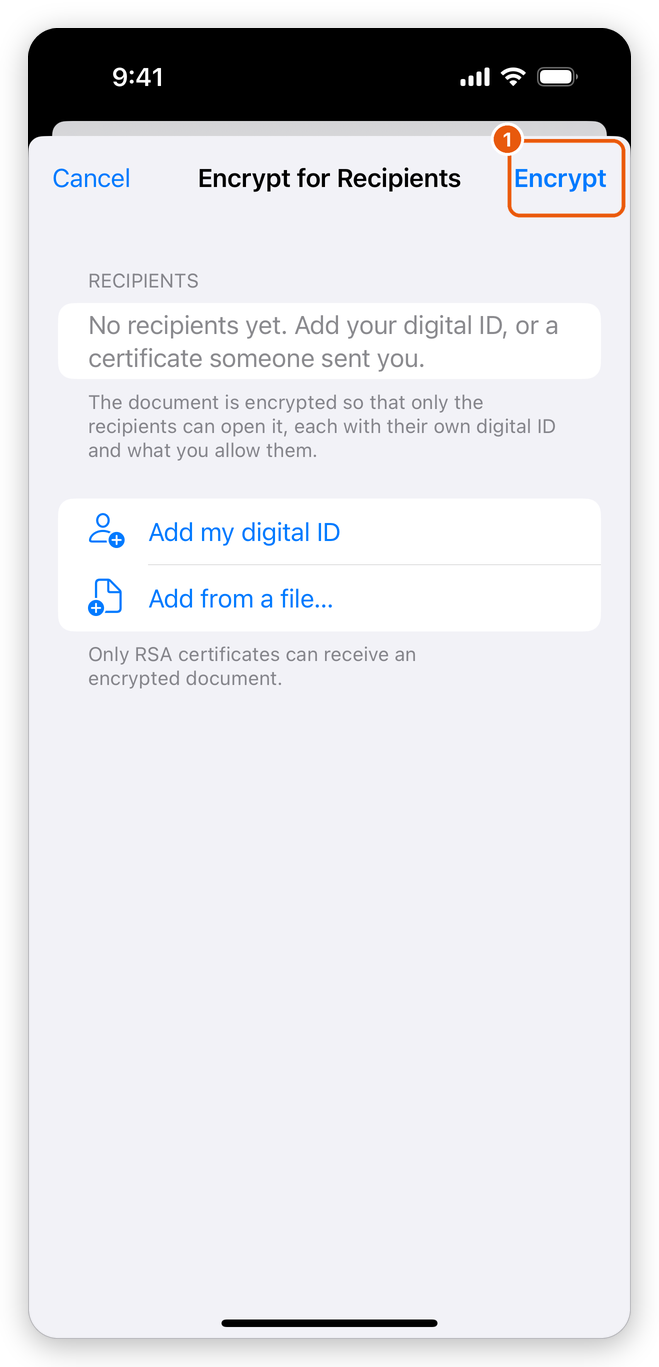
- Add my digital ID: one of your own digital IDs.
- Add from a file…: a certificate a recipient sent you.
- Encrypt: encrypts the document for the recipients.
Every recipient gets full access to the document. Encrypting with certificates replaces any password the document had. The document stays open in the app and you can go on working on it; it keeps its security when it is saved. Undo takes the encryption back while the document is open.
Only certificates with an RSA key can receive an encrypted document; the app says so when a certificate cannot. If none of the recipients is one of your digital IDs, the app warns you first: once the document is saved and closed, you could not open it again. A signed document cannot be encrypted, as encrypting would break its signatures: encrypt it before you sign.
Open a document encrypted for you
When you open a document encrypted with certificates, the app asks which of your digital IDs to open it with:
- In Open with a Digital ID, tap your digital ID.
- Type its password, and tap Done.
If that digital ID is not one of the recipients, the app says so and asks again: choose another one, or tap Cancel. If there is no digital ID on this device, the app says so: add yours in Settings > Digital IDs, then open the document again.
To receive encrypted documents, send your certificate, not your digital ID file: the certificate holds no private key and needs no password.
Change or remove certificate security
- To change the recipients, tap Encrypt for Recipients again and choose them anew: the new list replaces the old one.
- To remove the security, tap Protect with Password. The app says This document is encrypted for recipients. Tap Remove Encryption; the app says The encryption was removed.
- To protect the document with a password instead, tap Protect with Password, and Protect with Password again in the message that follows (see Protect a PDF with a password).
Changing or removing the security needs full access to the document.