Certificate security
Encrypt a document so that only certain people can open it, each with their own digital ID, and open documents encrypted for you.
Encrypting for recipients needs Pro.
A password has to be sent to everyone who should open a document. Encrypting for recipients needs none: the document is encrypted for the certificates of the people who may open it, and each opens it with their own digital ID.
Encrypt a document for recipients
- Tap More, then Protect & Redact, then Encrypt for Recipients.
- Add the recipients:
- Add my digital ID: you, so that you can still open the document. Choose your digital ID, and type its password.
- Add from a file…: the certificate someone sent you (a .cer, .crt, .pem or .p7b file), or their digital ID's file.
- To take someone off the list, touch and hold them, then tap Delete.
- Tap Encrypt.
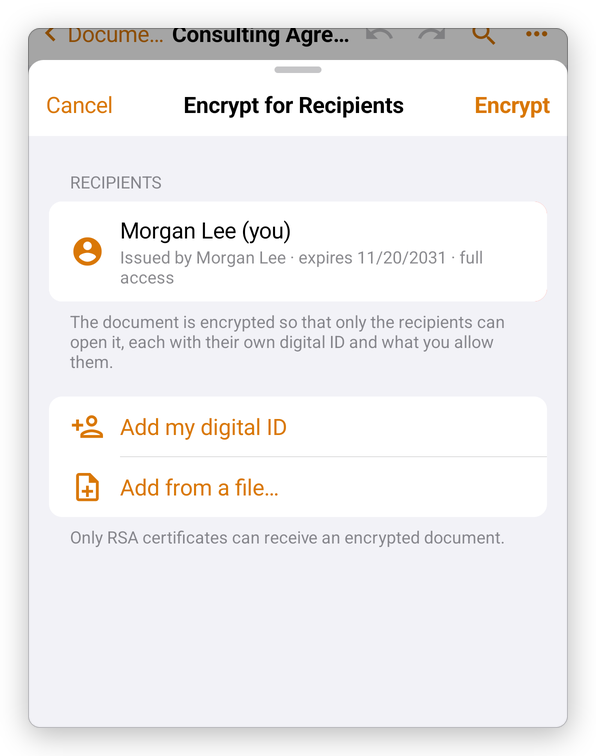
Each recipient can open the document with full access. Only RSA certificates can receive an encrypted document. If you do not add yourself, the app warns you: you would not be able to open the document again.
Your digital IDs are in Settings, under Digital IDs. See Digital signatures to add or create one.
Remove certificate security
Open the document with your digital ID, then tap More, then Protect & Redact, then Protect with Password. The app says This document is encrypted for recipients.
- Tap Remove Encryption to take the encryption away; the app says The encryption was removed.
- Tap Protect with Password to protect the document with a password instead (see Protect a PDF with a password).
Open a document encrypted for you
When you open such a document, the app finds your digital ID among its recipients and asks for its password. Without a digital ID of one of the recipients, the document cannot be opened.