Document properties
See and change a document's title, author, subject and keywords, its file details, and what its security allows.
Tap More, then Document Properties.
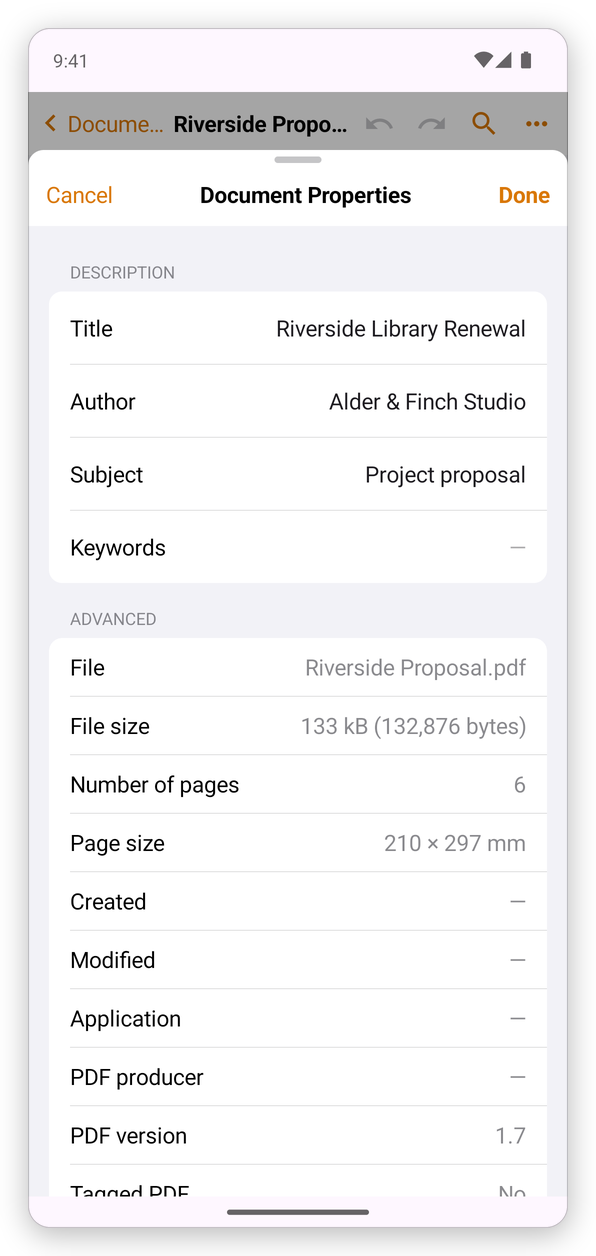
Description
Title, Author, Subject and Keywords describe the document. Search engines, other PDF apps and some libraries of documents show them. Tap one to change it, then tap Done to keep your changes, or Cancel.
Advanced
What the file is: its name, its size, the number of pages and their size, when it was made and last changed, the application that made it and the PDF producer that wrote it, the PDF version, whether it is a Tagged PDF (one that screen readers can read in order, see Accessibility) and whether it is set up for Fast web view. A dash means the document does not say.
Security
Scroll down to see how the document is protected: No security, a password, or certificates, and what it allows: Printing, Changing the document, Content copying, Commenting, Filling of form fields, Signing and the others.
Change settings… opens the protection settings, to add, change or remove the document's passwords and permissions. See Protect a PDF.