Save as PDF/A
Save a copy of a document as PDF/A, the ISO standard for long-term archiving, at the conformance level you need.
Saving as PDF/A needs Pro.
PDF/A is the ISO standard for documents kept for a long time: every font is embedded, colours are defined, and nothing depends on outside resources, so the document looks the same in many years. Courts, public offices and archives often ask for it.
- Open the document.
- Tap More, then Tools, then Save as PDF/A.
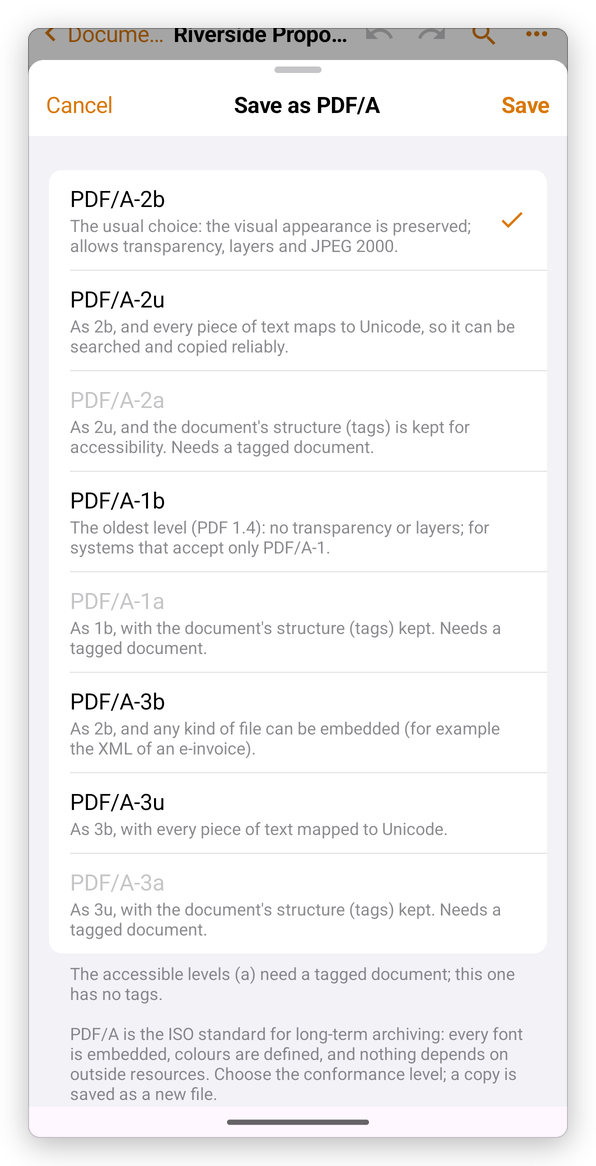
- Choose the conformance level. PDF/A-2b is chosen at first: it is the usual choice.
- Tap Save.
The levels:
- PDF/A-2b: the appearance is kept; transparency, layers and JPEG 2000 are allowed.
- PDF/A-2u: as 2b, and every piece of text maps to Unicode, so it can be searched and copied reliably.
- PDF/A-2a: as 2u, and the document's structure (tags) is kept, for accessibility.
- PDF/A-1b and PDF/A-1a: the oldest level (PDF 1.4), with no transparency or layers, for systems that accept only PDF/A-1.
- PDF/A-3b, PDF/A-3u and PDF/A-3a: as the PDF/A-2 levels, and any kind of file can be attached, for example the XML of an e-invoice.
The a levels need a tagged document: for a document without tags they are greyed. To add tags, use SelectPdf PDF Editor on a computer.
The app saves a copy as a new file next to the document, and opens it. The original does not change.