Export a PDF
Convert a PDF to Word, Excel, PowerPoint, RTF or text, save its pages as JPEG or PNG pictures, and compress documents as a ZIP.
The conversions run on your phone: nothing is uploaded. What they make is shared with Android's share sheet, so you can save it in Files or Google Drive, send it by email, or open it in another app.
From an open document
Tap More, then Export:
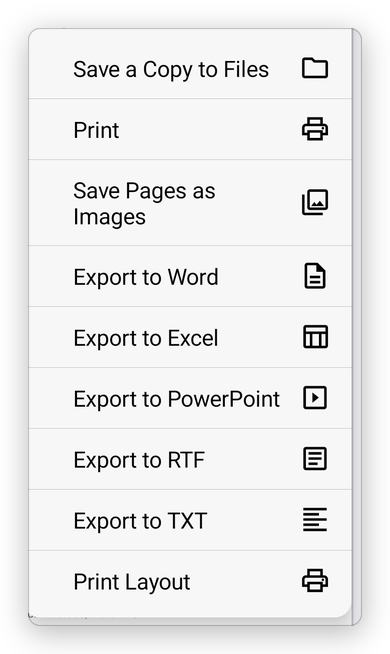
- Export to Word, Export to Excel, Export to PowerPoint and Export to RTF (Pro): the document as an editable file.
- Export to TXT: its text.
- Save Pages as Images: each page as a picture.
- Save a Copy to Files and Print: see Save a PDF and Print.
Export to Word asks how the Word document should look. Every choice keeps the text, the pictures and the tables:
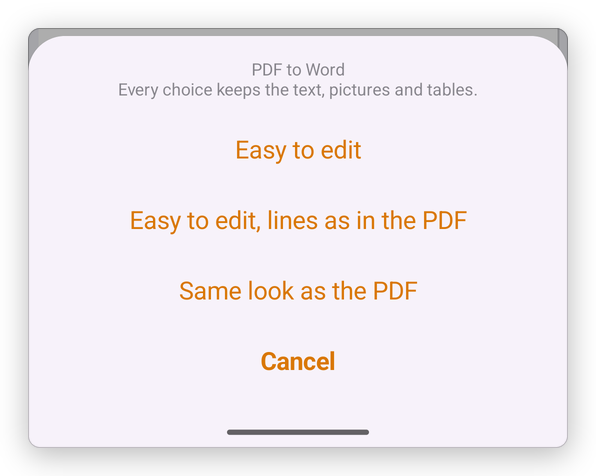
- Easy to edit: the text flows in paragraphs, as if it had been typed in Word.
- Easy to edit, lines as in the PDF: the same, with each line ending where it ends in the PDF.
- Same look as the PDF: each page laid out as it is, in text boxes, for when the look matters more than editing.
When the file is ready, the share sheet opens:
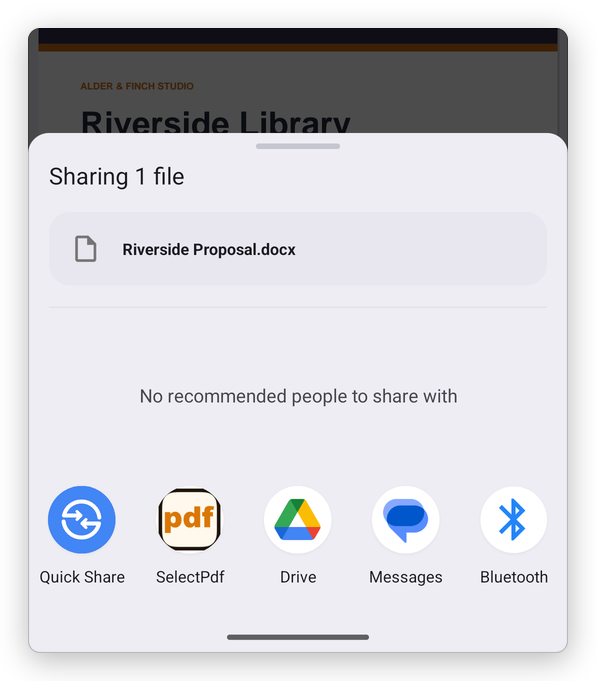
Export to Word, Excel, PowerPoint and RTF needs Pro. Text and pictures are free.
From the Tools tab
The Tools tab, under Convert from PDF, has the same conversions for any document of your library: PDF to Word, PDF to Excel, PDF to PowerPoint, PDF to TXT, PDF to RTF, PDF to JPEG and PDF to PNG. Tap one, and choose the document.
Compress as ZIP, under Others, puts the documents you choose in a ZIP file, to send them together.
Text of scanned pages
A scanned page is a picture: Word, Excel and text get only what the page has as text. Recognize the text first: see Recognize text.