PDF Portfolios
Open a PDF Portfolio and work with its files, and package files of any kind into a new portfolio.
A PDF Portfolio is one PDF that packages several files: PDFs, spreadsheets, pictures, documents of any kind. Each file keeps its own format and can be opened and saved on its own. Portfolios are a tidy way to send everything about a project in one file.
Open a portfolio
Open the portfolio as any PDF. A notice above the pages says that the document is a PDF Portfolio and how many files it holds. Its page is a cover that lists the files.
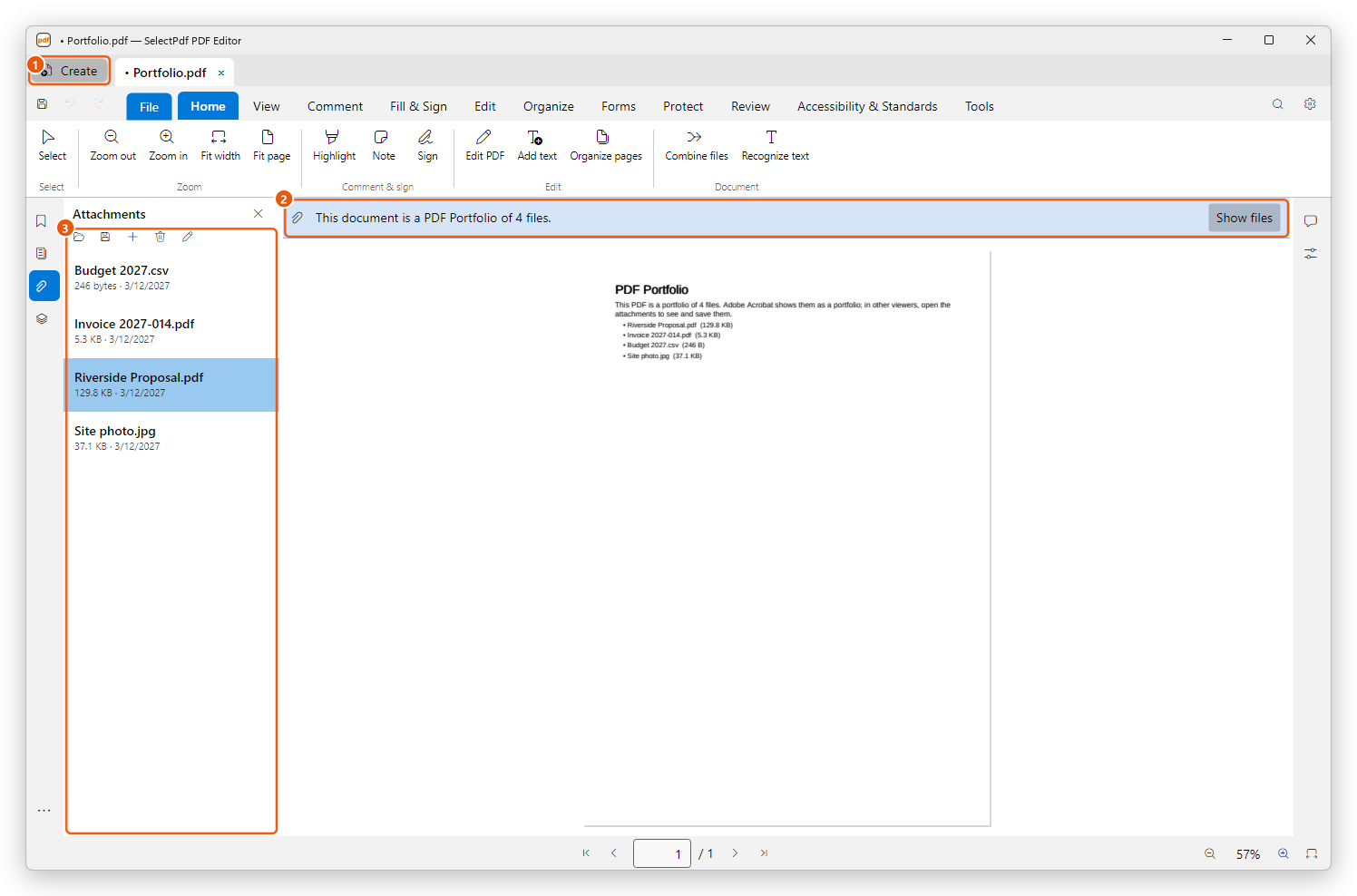
- Create, at the left of the document tabs: its menu has Create PDF Portfolio (see below).
- The notice. Show files opens the Attachments panel.
- The portfolio's files, with their size and date.
In the Attachments panel:
- Double-click a file, or select it and click Open, to see it. A PDF opens in a tab of its own; a Word, Excel or PowerPoint document, a text file or a picture opens as a preview made into a PDF; other files open with the app Windows uses for them, after you confirm.
- Click Save attachment to save a file out of the portfolio.
- Attach a file, Delete attachment and Edit description add files to the portfolio, remove them, and describe them.
Attachments explains each of these in full.
Create a portfolio
- Click Create at the left of the document tabs.
- Choose Create PDF Portfolio.
- Choose the files to put in it and click Open. Select several at once with Ctrl or Shift.
The new portfolio opens in a tab named Portfolio. Its cover lists the files with their sizes, and each file keeps its name and date. Save it (Ctrl+S) under a name of your own.
Programs and scripts are left out of a portfolio.
Portfolios in other PDF readers
Adobe Acrobat shows a portfolio as a list of its files. Other PDF readers show its cover page; their attachments pane lists the files, so they can still be opened and saved. The cover says this to whoever opens it.
To make one PDF of several documents, with all their pages one after another, use Combine files instead. A portfolio keeps the files separate and in their own formats.
Creating a portfolio and opening and saving its files are free. Adding files to a portfolio, deleting them and editing their descriptions need Pro, as for any attachments.